


From Concept to QA: What a Full-Lifecycle Salesforce AI Agent Actually Looks Like
When we first launched Andi, Atrium’s “first AI consultant”, we initially focused on development. The biggest gap in our ability to leverage AI to accelerate our work happened to be with Salesforce configuration, where “clicks not code” had started to become a hindrance. For the first year of Andi’s existence, I told customers to “think of Andi like a developer on your team.”
Andi has continued to grow into a really good Salesforce developer, not just for configuration, but also for Apex. But what has me more than excited is that Andi has evolved well beyond development. We have expanded Andi’s focus from pure development into an agent that can cover the full Salesforce lifecycle, an assistant that can take an initial idea and create a detailed solution, develop that solution, write its own test cases, and run those test cases inside Salesforce.
In this blog, I’ll walk you through an end-to-end use case, so that you can see the power of contextually-aware AI design flowing seamlessly into AI development and cutting-edge agentic browser testing, all powered through one Salesforce AI Agent, Andi.
The use case
In order to demonstrate the breadth of what Andi can do, I figured I’d tackle a use case that has plagued many a Salesforce instance over the years: Approval Delegation. As many have experienced, standard Salesforce functionality allows assignment of a delegate for approvals, but that’s where the functionality stops. If you forget to assign a delegate before going out of office, or you have pending approvals you couldn’t get to before that week-long vacation, there’s no easy way to handle that in standard Salesforce.
Of course, Salesforce is one of the most customizable platforms on the planet, and so with a little work, we can build that functionality, and I’m going to use Andi to do all of it.
Andi as solutioning agent
To start creating the above solution, I enter the following starter prompt into the Andi web interface:
I need to create a solution that solves handling approvals when someone goes on vacation. I effectively want to create a Smart Out-of-Office Approval Routing system that closes the gap in Salesforce where there’s no start or end date associated with Delegated Approvers. As part of the solution, I need to do the following:
1) Track upcoming start/end dates for vacations
2) Insert a check to make sure that when a new request is routed for approval that the person isn’t on vacation; if they are, route to the delegate
3) Check existing pending requests in a user’s queue and reassign to a delegate when they start on vacation
4) Make sure that new requests that come in after the end date of the vacation are not routed to the delegate
Can you help me lay out how to solve this in my Salesforce instance?
Andi immediately goes to work. But here’s where Andi is different from other LLMs. Instead of creating a generic solution, Andi has full contextual awareness of my Salesforce org, meaning it understands the entirety of what already exists in my org, as well as common patterns that allow it to design a solution that is right for my org without creating additional technical debt.
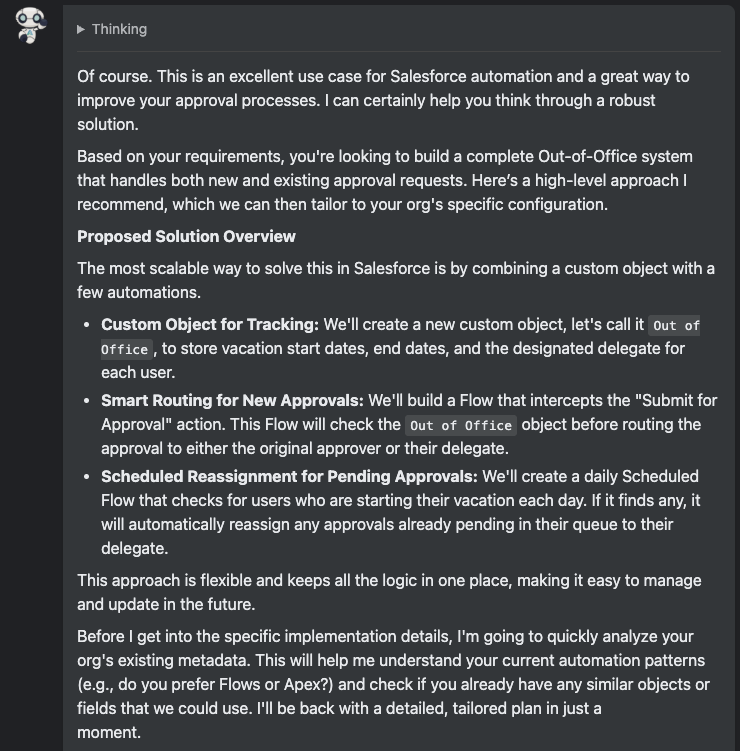
Note what Andi says at the end: “Before I get into the specific implementation details, I’m going to quickly analyze your org’s existing metadata. This will help me understand your current automation pattern and check if you already have any similar objects or fields that we could use.”
This isn’t a generic solution in a vacuum; it’s Andi designing specifically for the org in which it is working. To further enhance this feature, we’ll be releasing Supplementary Context uploads at the end of March 2026. This will allow Andi customers to add their own intelligence to Andi— in the form of files like development standards, naming conventions, or design documents—that will make Andi even more intelligent in how it solutions.
In our example above, Andi actually found a few components that already exist, namely the Out_of_Office__c object, as well as an Apex class that might solve our reassignment piece.
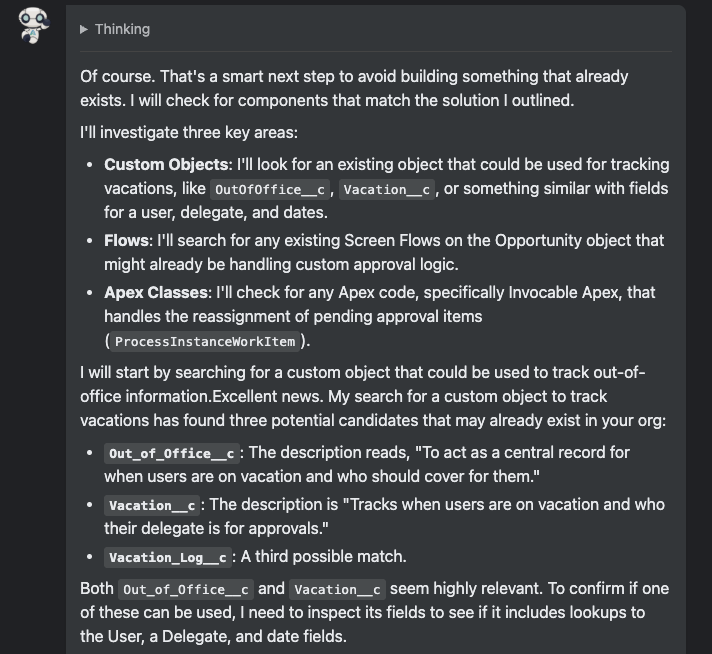
After identifying some potential custom object matches, it further evaluates the fields on those objects.
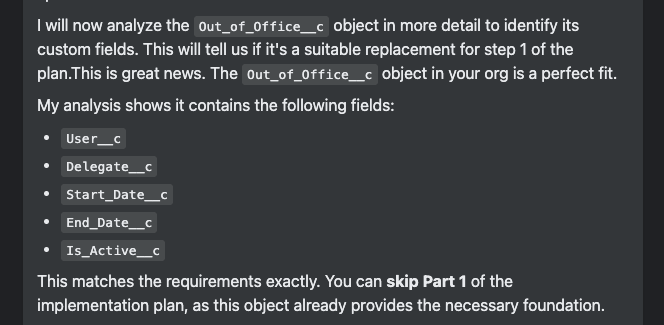
It correctly concludes that the Out_of_Office__c object has all of the fields needed, and lets us know we can skip this part of the development process.
There’s still development work to do, however, and so we’ll move on to building our “intercepting” before-save Flow for new approval assignments.
Andi as development agent
Andi started out as a developer, but its capabilities continue to evolve. In addition Andi’s best-in-class ability to create complex Salesforce configuration like Flows, it can also fill in as an expert Apex developer, both creating or modifying custom code in your Salesforce system.
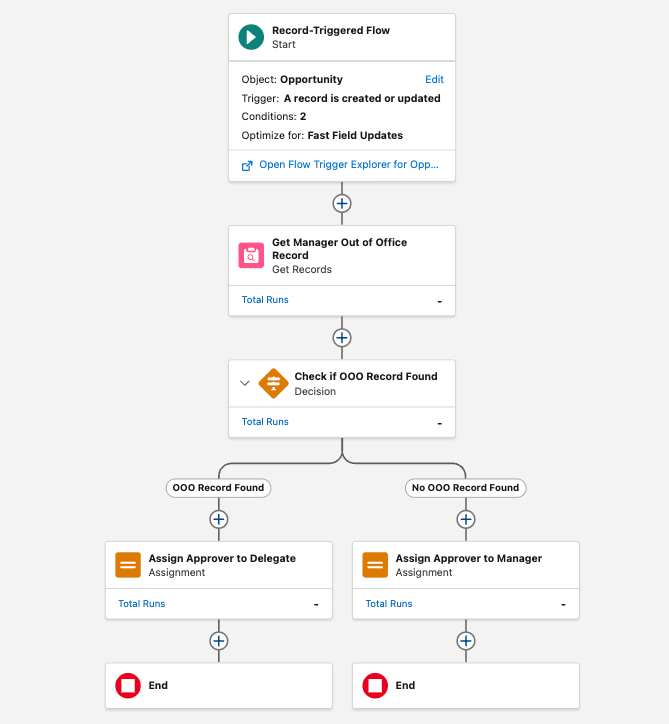
In order to get our Smart Out-of-Office Approval Routing system ready to go, we need to build that before-save Flow. I worked with Andi to come up with the ideal solution. As Andi evaluated options, it pointed out that the cleanest way to handle this scenario was to add an Approver field to the Opportunity object that we could default to the standard approver (in this case, the Opportunity Owner’s Manager) on creation, but one that we could then update with the appropriate approver when that Manager was on vacation. After using Andi to add that field, we moved forward to build the Flow. Andi had a few clarifying questions and then proceeded to knock out the Flow in under 2 minutes.
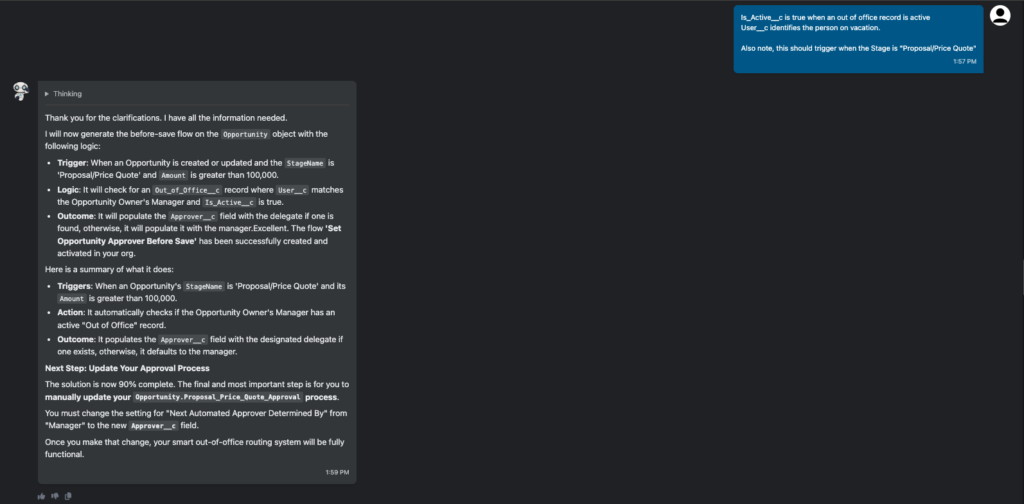
To quickly check the work, I had Andi give me a link:

But wait! There’s more! Let’s now test this Flow.
Andi as QA agent
Why stop with development? Andi can now write and execute its own test cases as well. I gave it a simple prompt—”can you write me a test case for this flow?”—and it didn’t disappoint. It transferred me to the QA Agent, and then returned *seven* test cases in under a minute I could use to validate the Flow satisfied the business requirements:
I have generated a comprehensive set of test cases for the “Set Opportunity Approver Before Save” flow. They cover positive scenarios, negative conditions, and boundary cases to ensure the logic is robust.
Please review the following test cases. Let me know if they look correct or if you’d like any changes. Once you approve, I can proceed with executing them.
Generated Test Cases for: Set_Opportunity_Approver_Before_Save
Flow Description: Before-save on Opportunity: When Amount > 100k and Stage is ‘Proposal/Price Quote’, this flow sets the Approver__c field. It assigns the owner’s manager as the approver, unless the manager has an active ‘Out of Office’ record, in which case it assigns the designated delegate.
Test Case 1: Positive: Approver set to Manager
- Description: Validates that when an Opportunity is created with Amount > 100k and Stage ‘Proposal/Price Quote’, and the owner’s manager is NOT out of office, the Approver__c field is set to the manager.
- Steps:
- Create an Opportunity with Amount = 150,000 and Stage = ‘Proposal/Price Quote’.
- Verify that the Approver__c field on the new Opportunity is set to the ID of the Opportunity Owner’s Manager.
Test Case 2: Positive: Approver set to Delegate
- Description: Validates that if the owner’s manager has an active ‘Out of Office’ record, the Approver__c is set to the specified delegate.
- Steps:
- Create an active Out_of_Office__c record for a Manager, specifying a Delegate.
- Create an Opportunity owned by a user who reports to that Manager, with Amount = 200,000 and Stage = ‘Proposal/Price Quote’.
- Verify that the Approver__c field on the new Opportunity is set to the ID of the Delegate user.
Test Case 3: Negative: Amount does not meet criteria
- Description: Validates that the flow does not set the Approver__c field when the Opportunity Amount is not greater than 100k.
- Steps:
- Create an Opportunity with Amount = 99,000 and Stage = ‘Proposal/Price Quote’.
- Verify that the Approver__c field on the new Opportunity is null.
…
(and 4 additional test cases)
_____________
Would you like me to execute these tests?
Of course, I would like Andi to execute the tests. I asked it to run the first test.
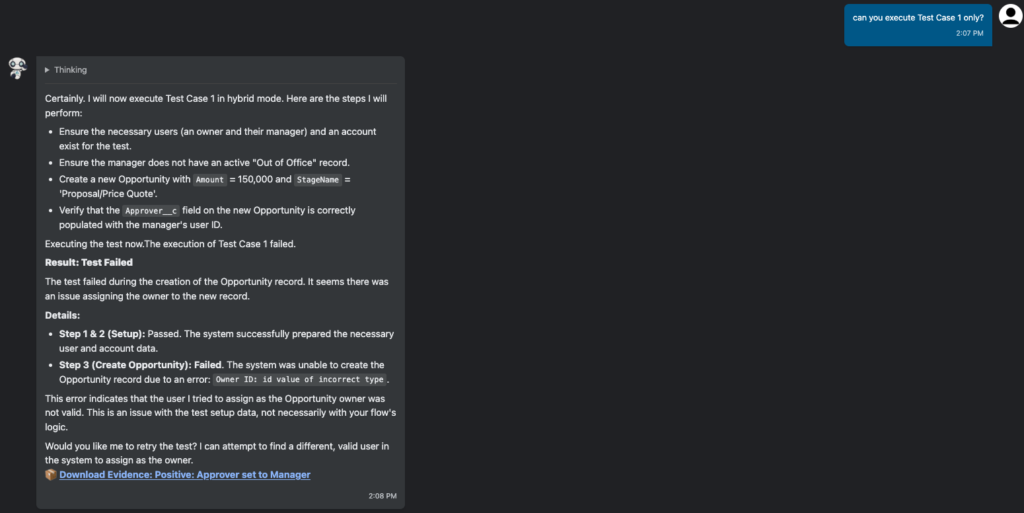
The test failed, but simply because I didn’t have any data set up in the system. At this point, I had two options: I could manually set up my data, or I could modify my test case to tell Andi what to use in its test scenario. Either works well, and you can see how Andi’s QA capability can really help complete the end-to-end process.
End-to-end vibe solutioning and execution with Andi
You can clearly see the opportunities for efficiency. No swivel-chairing between tools, no handoffs between several people; a single user with an understanding of the business requirement and a basic modicum of Salesforce technical aptitude can now run an entire story, from conception through testing, using a single tool: Andi.
This is not to say that it needs to be one human, or that you shouldn’t have additional humans-in-the-loop validating the outputs along the way. But Andi moves way beyond “vibe coding”; this is end-to-end vibe solutioning and execution, from design through development and testing. It’s the next frontier of Salesforce system modification, and Andi is leading the way.