


Building a Data Clean Room That Developers Can Actually Use
The uncomfortable truth about data masking
Every organization with sensitive data eventually faces the same question: How do we protect it?
The textbook answer (mask it) sounds simple. Replace Social Security numbers with asterisks. Null out salary figures. Swap dates of birth with 1900-01-01. Done.
Except it isn’t done. The moment you apply blanket masking to a dataset, you’ve also destroyed its utility. Engineers can’t build pipelines against data where every join key resolves to ***MASKED***. Analysts can’t aggregate numbers that are all NULL. Time-series analyses collapse when every date is the same.
The real question is: how do we give each persona the minimum exposure they need, no more and no less, across a complex multi-account environment?
This article describes how we solved that problem for a financial services firm running Snowflake across two accounts, dozens of roles, and hundreds of tables containing PII and monetary data.
The landscape
The organization operates a two-account Snowflake topology:
- Account A (Production & QA): The data clean room. Raw vendor and custodian data lands here. Curated, transformed data lives here. This is the system of record.
- Account B (Development): Where engineers build and test data pipelines, and where analysts explore data in personal sandbox databases.
Account B receives production source data from Account A through a Snowflake Data Share. No data duplication, no ETL. Just a live, read-only mount of the production source tables.
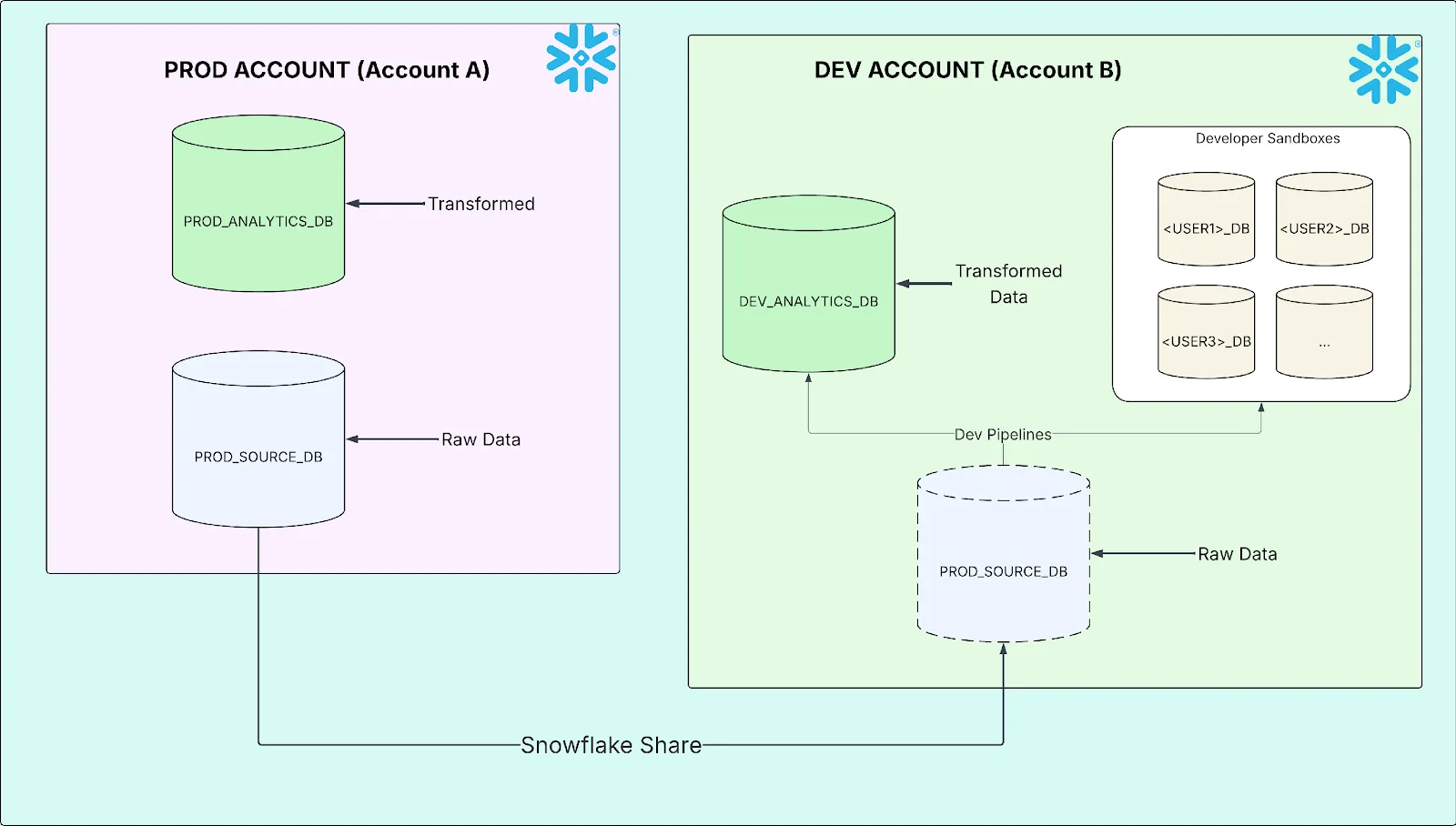
The two-account setup works well for most purposes. But it creates a masking problem with no obvious solution.
Three personas, three needs
Every user in the organization falls into one of three categories, each with different data access requirements:
| Persona | What They Need | Why |
|---|---|---|
| Admin / Executive Analyst | Raw, unmasked data | Audit, troubleshooting, compliance, reconciliation |
| Engineer | Usable data: joinable keys, calculable numbers, ordinal dates | Pipeline development, testing, QA |
| Restricted Analyst | Aggregated or obfuscated data only | Reporting contexts where PII is exposed are not permitted |
The engineer persona is the interesting one. They don’t need to see that a customer’s name is Teren Jones, but they do need every row with the same name to produce the same join key. They don’t need to know someone earns $85,000, but they need SUM(salary) to return a number, not NULL. They need dates to sort correctly, window functions to partition meaningfully, and aggregations to behave like real data.
Blanket masking gives the restricted analyst what they need and breaks everyone else. No masking gives admins what they need and violates every compliance policy. The challenge is building the middle tier, and making all three tiers coexist in a multi-account environment.
Here’s what the three tiers look like in practice. Consider a source row:
|
DATE_OF_BIRTH |
|
|||
|---|---|---|---|---|---|
| Teren Jones | hiero_hero@third.eye | 1990-06-15 | 85000.00 |
Admin / Full-Access: Raw data, unchanged.
| CUSTOMER_NAME | DATE_OF_BIRTH | SALARY | |
|---|---|---|---|
| Teren Jones | hiero_hero@third.eye | 1990-06-15 | 85000.00 |
Engineer (Tokenized): Hashed strings, fuzzed numbers, sensitive dates masked.
| CUSTOMER_NAME | DATE_OF_BIRTH | SALARY | |
|---|---|---|---|
| a3f2b7c9e1d4… | 8b21e4f6a0c3… | 1900-01-01 | 104652.30 |
Restricted Analyst: Full static masking.
| CUSTOMER_NAME | DATE_OF_BIRTH | SALARY | |
|---|---|---|---|
| ***MASKED*** | ***MASKED*** | 1900-01-01 | NULL |
The rest of this article explains how to make all three tiers coexist without manual intervention.
The “masked on arrival” problem
Snowflake Data Shares enforce the provider’s masking policies. When Account B queries shared data, the masking logic runs on Account A. This is a security feature: the consumer can’t override or remove the provider’s protections.
But it creates a cascading problem. If Account A’s masking policy says “mask everything for non-admin roles,” then every role in Account B, including the service account running dbt, every engineer, every analyst, sees fully masked data. The share doesn’t know about Account B’s role hierarchy. It only knows the caller isn’t an Account A admin.
Here’s what fully masked data does to common engineering operations:
| Operation | What Happens | Consequence |
|---|---|---|
| JOIN ON customer_name | Every row joins on ‘***MASKED***’ | Cartesian product / row explosion |
| SUM(salary) | Every value is NULL | Aggregation returns NULL |
| WHERE dob > ‘2000-01-01’ | Every date is 1900-01-01 | Zero rows returned |
| ROW_NUMBER() OVER (ORDER BY dob) | All dates identical | Meaningless, arbitrary ordering |
This is what happens when you share masked data to a development account without solving the cross-account masking problem.
The fundamental constraint: masking policies on Account B cannot be applied to shared objects from Account A. The provider retains governance authority. So the solution must live in Account A, but serve the needs of Account B’s role hierarchy.
Database roles travel with the share
The masking policies in this article operate on column values using only built-in Snowflake functions (SHA2, UNIFORM, RANDOM, SIGN, ROUND, etc.). Masking designs that reference UDFs, external functions, or other database objects are outside the scope of this discussion.
Snowflake’s database roles are the mechanism that makes multi-account masking possible. Unlike account-level roles, database roles are defined within a database and can be granted to a share. When the share is mounted on the consumer account, those database roles become visible, and IS_DATABASE_ROLE_IN_SESSION() can check for them inside masking policy logic.
This means a masking policy running on Account A can ask: Does the user querying from Account B have a particular database role? And branch accordingly.
The design
Three database roles, created on Account A and attached to the share:
| Database Role | Purpose | Granted To (on Account B) |
|---|---|---|
| UNRESTRICTED_ACCESS | See raw, unmasked data | Admins, transform service accounts, full-access analysts |
| TOKENIZED_ACCESS | See deterministic tokens: hashed strings, fuzzed numbers, real dates | Engineers (DEVELOPER_FR) |
| RESTRICTED_ACCESS | See fully masked data: static strings, nulled numbers, epoch dates | Restricted analysts (ANALYST_FR) |
Provider side (Account A)
The database roles are created inside the source database, granted access to the schemas, and then attached to the share:
-- 1. Create database roles in the source database
CREATE DATABASE ROLE PROD_SOURCE_DB.UNRESTRICTED_ACCESS;
CREATE DATABASE ROLE PROD_SOURCE_DB.TOKENIZED_ACCESS;
CREATE DATABASE ROLE PROD_SOURCE_DB.RESTRICTED_ACCESS;

-- 2. Grant schema access to each role
GRANT USAGE ON SCHEMA PROD_SOURCE_DB.SRC
    TO DATABASE ROLE PROD_SOURCE_DB.UNRESTRICTED_ACCESS;
GRANT SELECT ON ALL TABLES IN SCHEMA PROD_SOURCE_DB.SRC
    TO DATABASE ROLE PROD_SOURCE_DB.UNRESTRICTED_ACCESS;

GRANT USAGE ON SCHEMA PROD_SOURCE_DB.SRC
    TO DATABASE ROLE PROD_SOURCE_DB.TOKENIZED_ACCESS;
GRANT SELECT ON ALL TABLES IN SCHEMA PROD_SOURCE_DB.SRC
    TO DATABASE ROLE PROD_SOURCE_DB.TOKENIZED_ACCESS;

GRANT USAGE ON SCHEMA PROD_SOURCE_DB.SRC
    TO DATABASE ROLE PROD_SOURCE_DB.RESTRICTED_ACCESS;
GRANT SELECT ON ALL TABLES IN SCHEMA PROD_SOURCE_DB.SRC
    TO DATABASE ROLE PROD_SOURCE_DB.RESTRICTED_ACCESS;

-- 3. Attach database roles to the share
GRANT DATABASE ROLE PROD_SOURCE_DB.UNRESTRICTED_ACCESS
    TO SHARE PROD_SOURCE_DB_SHARE;
GRANT DATABASE ROLE PROD_SOURCE_DB.TOKENIZED_ACCESS
    TO SHARE PROD_SOURCE_DB_SHARE;
GRANT DATABASE ROLE PROD_SOURCE_DB.RESTRICTED_ACCESS
    TO SHARE PROD_SOURCE_DB_SHARE;
Step 3 is what makes this work across accounts. When a database role is granted to a share, it travels with the share to the consumer. Without this step, IS_DATABASE_ROLE_IN_SESSION() would never return TRUE on Account B.
Consumer side (Account B)
On Account B, the shared database roles are granted to local functional roles, the final link determining who sees what:
-- Map shared database roles to local roles
GRANT DATABASE ROLE PROD_SOURCE_DB.UNRESTRICTED_ACCESS
    TO ROLE ADMIN_UNMASKED_FR;
GRANT DATABASE ROLE PROD_SOURCE_DB.UNRESTRICTED_ACCESS
    TO ROLE TRANSFORM_EXECUTOR_UNMASKED_FR;
GRANT DATABASE ROLE PROD_SOURCE_DB.UNRESTRICTED_ACCESS
    TO ROLE ANALYST_UNMASKED_FR;

GRANT DATABASE ROLE PROD_SOURCE_DB.TOKENIZED_ACCESS
    TO ROLE DEVELOPER_FR;

GRANT DATABASE ROLE PROD_SOURCE_DB.RESTRICTED_ACCESS
    TO ROLE ANALYST_FR;
Now when a user with DEVELOPER_FR queries a shared table, Snowflake evaluates the masking policy on Account A, checks IS_DATABASE_ROLE_IN_SESSION(‘TOKENIZED_ACCESS’), finds it granted through the share, and returns SHA2-hashed strings and fuzzed numbers instead of raw data.
The masking policy logic
The masking policies on Account A are rewritten to evaluate these roles in priority order. Here’s the string policy:
-- String masking policy
CASE
    WHEN IS_DATABASE_ROLE_IN_SESSION('UNRESTRICTED_ACCESS')
        THEN val
    WHEN IS_DATABASE_ROLE_IN_SESSION('TOKENIZED_ACCESS')
        THEN SHA2(val)
    WHEN CURRENT_ROLE() IN (
        'ACCOUNTADMIN',
        'ORGADMIN',
        'SECURITYADMIN',
        'SYSADMIN'
    )
        THEN val
    ELSE '***MASKED***'
END
The number policy is where the fuzz factor lives:
-- Number masking policy
CASE
    WHEN IS_DATABASE_ROLE_IN_SESSION('UNRESTRICTED_ACCESS')
        THEN val
    WHEN IS_DATABASE_ROLE_IN_SESSION('TOKENIZED_ACCESS')
        THEN IFF(val = 0, 0,
               SIGN(val) * GREATEST(
                 ABS(ROUND(val * UNIFORM(0.5::NUMBER(38,10),
                                         1.5::NUMBER(38,10),
                                         RANDOM()), 2)),
                 0.01))
    WHEN CURRENT_ROLE() IN (
        'ACCOUNTADMIN',
        'ORGADMIN',
        'SECURITYADMIN',
        'SYSADMIN'
    )
        THEN val
    ELSE NULL
END
The number policy deserves a close read. For the tokenized tier, it preserves zero values (IFF(val = 0, 0, …)), maintains sign (SIGN(val)), randomly scales the absolute value between 50% and 150% (UNIFORM(0.5, 1.5, RANDOM())), rounds to two decimal places, and enforces a floor of $0.01 (GREATEST(…, 0.01)). The result is numbers that are plausible, calculable, and non-identifiable.
The CURRENT_ROLE() check is a fallback for Account A’s own admin roles, which query data locally and don’t go through the share. Database roles aren’t relevant for them.
When validating masking policies, always run USE SECONDARY ROLES NONE; first. Snowflake’s secondary roles can satisfy a higher-privilege branch through an inherited role, making the policy appear misconfigured when it’s actually working correctly.
Classification profiles
These masking policies don’t apply themselves. On Account A, they’re bound to columns through tag-based masking, a Snowflake feature where a tag on a column automatically triggers the associated masking policy at query time.
The tags themselves come from a Classification Profile attached to each production database. The profile continuously scans columns, matches them against a list of semantic categories (NAME, EMAIL, BANK_ACCOUNT, DATE_OF_BIRTH, etc.), and applies a tag to any match. That tag fires the masking policy. The chain is fully automatic:
New column appears → Classification profile scans it
    → Matches semantic category (e.g., EMAIL)
        → Tag applied (e.g., pii_classification_tag)
            → Masking policy fires on query
New tables created by vendor ingestion pipelines or schema changes are automatically scanned, classified, and masked without manual intervention. No column goes unprotected because someone forgot to tag it.
The classification profile is configured with a SET_TAG_MAP that maps semantic categories to the governance tag:
-- 1. Create the classification profile
CREATE SNOWFLAKE.DATA_PRIVACY.CLASSIFICATION_PROFILE
  prod_source_db.governance.pii_classification_profile(
    {
      'minimum_object_age_for_classification_days': 0,
      'maximum_classification_validity_days': 30,
      'auto_tag': true,
      'classify_views': true
    });

-- 2. Map semantic categories to the tag
CALL prod_source_db.governance.pii_classification_profile!SET_TAG_MAP(
  {'column_tag_map': [{
      'tag_name': 'prod_source_db.governance.pii_classification_tag',
      'tag_value': 'sensitive_pii',
      'semantic_categories': [
        'NAME', 'BANK_ACCOUNT', 'NATIONAL_IDENTIFIER',
        'PHONE_NUMBER', 'STREET_ADDRESS', 'TAX_IDENTIFIER',
        'EMAIL', 'CITY', 'POSTAL_CODE', 'COUNTRY',
        'DATE_OF_BIRTH', 'PAYMENT_CARD'
      ]
  }]}
);

-- 3. Attach the profile to the database
ALTER DATABASE prod_source_db
  SET CLASSIFICATION_PROFILE =
    'prod_source_db.governance.pii_classification_profile';
Three configuration choices are worth calling out:
- Zero-day classification (minimum_object_age_for_classification_days: 0): classify new objects immediately, not after a waiting period.
- 30-day revalidation: re-scan monthly to catch schema drift, like new columns added to existing tables.
- View classification: views can expose sensitive data as easily as base tables.
How each transformation works
Strings are SHA2 hashed. This is deterministic: the same input always produces the same hash. So JOIN ON SHA2(customer_name) = SHA2(customer_name) still works. Foreign key relationships are preserved. Deduplication logic behaves correctly. The restricted tier replaces all strings with ‘***MASKED***’, a static value with no cardinality.
Numbers are fuzz-factored: randomly adjusted between 50% and 150% of the original value, with a floor of $0.01. Zeroes remain zero. This means SUM(), AVG(), MIN(), MAX() all return meaningful (if inexact) results. Pipeline logic can be validated. Range checks behave plausibly. The restricted tier nulls all numbers.
Dates are handled selectively and deliberately excluded from automatic masking. A small number of genuinely sensitive date fields (like dates of birth) are manually masked to 1900-01-01 for both the tokenized and restricted tiers; there is no middle-ground transformation for dates. Admins see the real date; everyone else sees the epoch. The vast majority of dates (effective start dates, effective end dates, file dates, transaction dates) are left unmasked for all tiers. The reasoning is explained in the design decisions below.
Mirroring production’s masking on locally created data
The classification profile and tag-based masking described above protect Account A’s production data. But Account B isn’t just reading shared data; it’s building on top of it. dbt pipelines produce snapshots, staging tables, conformed dimensions, and fact tables in DEV_ANALYTICS_DB. These locally created objects are not governed by Account A’s policies. They live in Account B’s own databases, outside the share.
Without a separate protection layer, any table materialized by dbt would expose unmasked PII to every role with SELECT privileges, including roles that should only see tokenized or fully masked data.
Mirror the same classification-and-masking setup that Prod already uses. Account B gets its own classification profile, configured identically, with the same semantic categories, the same tag, and the same zero-day scan cadence, attached to DEV_ANALYTICS_DB. New tables materialized by dbt on Tuesday morning are scanned, classified, and masked by the time anyone queries them. No developer intervention. No manual tagging.
Local masking policies
The masking policies on Account B mirror the same three-tier design as Account A, but use CURRENT_ROLE() instead of IS_DATABASE_ROLE_IN_SESSION(), because these policies govern local data, not shared data:
-- String policy (local data)
CREATE MASKING POLICY
  analytics_db.governance.pii_mask_string AS (val STRING) RETURNS STRING ->
  CASE
    WHEN CURRENT_ROLE() ILIKE '%UNMASKED%' THEN val
    WHEN CURRENT_ROLE() = 'DEVELOPER_FR' THEN SHA2(val)
    ELSE '***MASKED***'
  END;
The role-naming convention is deliberate. Any role that should see raw, unmasked data must contain the word UNMASKED in its name: ADMIN_UNMASKED_FR, TRANSFORM_EXECUTOR_UNMASKED_FR, ANALYST_UNMASKED_FR. The ILIKE ‘%UNMASKED%’ check is a whitelist-by-convention: new roles default to fully masked unless they explicitly opt into unmasked access by name. This avoids maintaining a hardcoded list of permitted roles and makes the system default-deny. A role created without the keyword sees nothing sensitive.
The service account that runs dbt pipelines (the transform executor) must see unmasked data. The reason is structural. dbt materializes tables and views at every layer of the data warehouse: snapshots in silver, conformed dimensions, gold facts and reporting views. If the service account saw tokenized or masked data, it would write tokenized or masked data into those tables. Admins and executive analysts querying downstream gold tables would see hashed strings and fuzzed numbers, not because of their own access level, but because the data was already destroyed at materialization time. This is why the transform executor role includes UNMASKED in its name (TRANSFORM_EXECUTOR_UNMASKED_FR) and is granted the UNRESTRICTED_ACCESS database role on shared data, ensuring raw data flows through every layer of the pipeline.
Securing developer sandboxes
Every engineer gets a personal sandbox database, a full clone of the development database. Cloning inherits tags, masking policies, and tagged columns — existing data is protected from day one. However, cloning does not fully preserve the classification profile. The masking policy-to-tag bindings are translated to reference the cloned objects, but the classification profile’s tag map still points to the source database’s tag, and the profile itself is not set on the clone. Without correction, the sandbox would have no active classification profile, meaning newly created tables would never be scanned or tagged.
The provisioning procedure
Rather than relying on engineers to configure their sandboxes correctly, a stored procedure handles everything. The core operations:
Validate and clone. The procedure checks that the username exists in Snowflake before creating anything, then clones the source database. Tags, masking policies, and tagged columns carry forward:
-- Validate username exists
SELECT COUNT(*) AS USER_COUNT
FROM SNOWFLAKE.ACCOUNT_USAGE.USERS
WHERE NAME = :USERNAME AND DELETED_ON IS NULL;

-- Clone the source database
CREATE DATABASE <USERNAME>_DB CLONE <SOURCE_DB>;
Grant ownership. The procedure transfers ownership of every object type in the cloned database (schemas, tables, views, sequences, stages, file formats, streams, procedures, and functions) to the engineering role:
GRANT OWNERSHIP ON DATABASE <USERNAME>_DB
    TO ROLE DEV_ENGINEER_FR REVOKE CURRENT GRANTS;
GRANT OWNERSHIP ON ALL SCHEMAS IN DATABASE <USERNAME>_DB
    TO ROLE DEV_ENGINEER_FR REVOKE CURRENT GRANTS;
-- ... repeated for all object types
Reconfigure the classification profile. The cloned classification profile still has its tag map pointing to the source database’s tag. The procedure fixes this by clearing the inherited tag map, setting a new one that references the sandbox-local tag, and then activating the profile on the sandbox database:
-- Clear the inherited tag map (still points to source DB's tag)
CALL <SANDBOX_DB>.UTIL.SENSITIVE_DATA_CLASSIFICATION_PROFILE!UNSET_TAG_MAP();

-- Set a new tag map pointing to the sandbox's own tag
CALL <SANDBOX_DB>.UTIL.SENSITIVE_DATA_CLASSIFICATION_PROFILE!SET_TAG_MAP(
    {'column_tag_map': [{
        'tag_name': '<SANDBOX_DB>.UTIL.SENSITIVE_DATA_TAG',
        'tag_value': 'sensitive_text',
        'semantic_categories': ['NAME', 'BANK_ACCOUNT', ...]
    }]}
);

-- Activate the classification profile on the sandbox
ALTER DATABASE <SANDBOX_DB> SET CLASSIFICATION_PROFILE =
    '<SANDBOX_DB>.UTIL.SENSITIVE_DATA_CLASSIFICATION_PROFILE';
With all three steps complete, the sandbox is fully protected:
- At creation: Protected (tags, masking policies, and tagged columns inherited from clone).
- Ongoing: Protected (classification profile reconfigured to use the sandbox-local tag and activated on the sandbox, so new objects are scanned and masked automatically).
No unmonitored databases. No gaps.
DEV_ANALYTICS_DB (source)
  ├── Classification Profile ✓
  ├── Masking Policies ✓
  └── Tagged columns ✓
         │
         │  CALL util.create_sandbox_db('JSMITH')
         ▼
JSMITH_DB (clone)
  ├── All tags & masking policies inherited ✓
  ├── Classification profile tag map → reconfigured to local tag ✓
  ├── Classification profile set on sandbox DB ✓
  └── New objects scanned automatically ✓
Validating the masking policies
Masking policies are invisible until they fire. Verifying correct behavior requires proactive testing. You can’t rely on users to report that they’re seeing masked data (or worse, that they’re not).
Step 1: Confirm classification tagging
Query the account-level tag references to verify that the classification profile has tagged the expected columns:
SELECT
    OBJECT_DATABASE,
    OBJECT_SCHEMA,
    OBJECT_NAME,
    COLUMN_NAME,
    TAG_VALUE
FROM SNOWFLAKE.ACCOUNT_USAGE.TAG_REFERENCES
WHERE TAG_NAME = 'PII_CLASSIFICATION_TAG'
  AND DOMAIN = 'COLUMN'
ORDER BY OBJECT_DATABASE, OBJECT_NAME, COLUMN_NAME;
If expected columns are missing, check the profile’s semantic category list and the column’s data type; classification only fires on types it recognizes.
Step 2: Query as each role tier
For each masking tier, activate the role, disable secondary roles, and inspect the output:
USE ROLE ADMIN_UNMASKED_FR;
USE SECONDARY ROLES NONE;
SELECT TOP 5 CUSTOMER_NAME, EMAIL, SALARY
FROM PROD_SOURCE_DB.SRC.CUSTOMERS;
-- Expected: raw values

USE ROLE DEVELOPER_FR;
USE SECONDARY ROLES NONE;
SELECT TOP 5 CUSTOMER_NAME, EMAIL, SALARY
FROM PROD_SOURCE_DB.SRC.CUSTOMERS;
-- Expected: SHA2 hashes for strings, fuzzed numbers

USE ROLE ANALYST_FR;
USE SECONDARY ROLES NONE;
SELECT TOP 5 CUSTOMER_NAME, EMAIL, SALARY
FROM PROD_SOURCE_DB.SRC.CUSTOMERS;
-- Expected: '***MASKED***' for strings, NULL for numbers
The USE SECONDARY ROLES NONE is critical. Without it, Snowflake may satisfy a higher-privilege masking branch through an inherited secondary role, making the policy appear misconfigured.
Design decisions
Why column-level masking instead of row access policies?
Every persona (admin, engineer, restricted analyst) needs to see the same rows. A dimension with 100,000 records should return 100,000 records for everyone. Row access policies would have filtered rows entirely, which means row counts would diverge across roles. There’d be no way to confirm that two people are looking at the same dataset. Column-level masking preserves that invariant: same rows, same structure, same counts. Just different values in the sensitive columns.
Why SHA2 for string tokenization?
SHA2 is deterministic and collision-resistant. The same input always produces the same output, so join keys are preserved. Different inputs produce different outputs, so cardinality is preserved. Engineers can’t reverse-engineer the original value, but they can join, deduplicate, and partition on tokenized keys exactly as they would on raw data.
Why fuzz numbers instead of nulling them?
Nulled numbers destroy aggregations. SUM(NULL, NULL, NULL) is NULL, not a useful test result. Fuzz-factored numbers (randomly scaled between 50% and 150%, with zeroes preserved) keep aggregations meaningful. Engineers can verify that their SUM() produces a number, their AVG() is in a plausible range, and their CASE WHEN amount > 0 logic branches correctly.
The fuzz factor is non-deterministic (unlike the string hashing), which means the same salary won’t always produce the same masked value. This is intentional. Monetary values shouldn’t be joinable across tables, because that would allow cross-referencing to reconstruct individual records.
There is an important prerequisite: all identifier columns, even numeric ones, must be typed as VARCHAR. If an account_id column is stored as NUMBER, the number masking policy will still fuzz it if a tag is applied. A fuzzed ID is useless as a join key; it changes on every query, so no two tables will ever match. By storing IDs as strings, they receive the deterministic SHA2 hash instead, which preserves joinability. This is a data modeling discipline that must be established before masking is deployed, not after.
Masking exact values vs. hiding value magnitude
The linear fuzz factor (scaling between 50% and 150%) obscures the exact value but preserves its order of magnitude. A $10 million balance produces a masked value between $5 million and $15 million. The exact figure is gone, but the neighborhood is preserved.
This is a deliberate tradeoff. Linear fuzzing leaks distributional shape: an engineer can see that some accounts are orders of magnitude larger than others. For this organization, that exposure was deemed acceptable. The tokenized tier is consumed by trusted internal engineers, not external parties, and the combination of hashed strings and fuzzed numbers makes it difficult to tie a magnitude back to a specific individual.
The alternative is log-space fuzzing, which shifts values by random orders of magnitude rather than random percentages, turning a $10 million balance into anything from $1 million to $100 million. This fully obscures magnitude but destroys aggregation fidelity and makes it impossible to validate tier-based business logic (fee schedules, reporting thresholds, AUM brackets). We chose linear fuzzing because engineers need SUM(amount) to land in a realistic range and threshold-based logic to fire in the correct tier. Organizations where magnitude itself could identify individuals should evaluate log-space fuzzing or a hybrid approach.
Why not auto-mask dates?
Dates are excluded from the automatic classification profile entirely. Fuzz factors destroy relational integrity: an effective_start_date shifted past its effective_end_date breaks every temporal query, SCD lookup, and validity check. Blanket masking to 1900-01-01 destroys DATEDIFF() calculations, window function ordering, incremental load filters, and range-based joins.
Most dates in a financial data warehouse are operationally critical: effective start/end dates, transaction dates, file dates, as-of dates. These must remain raw for pipelines to function. The few genuinely sensitive dates (dates of birth, hire dates, termination dates) are manually masked to 1900-01-01 via explicit column-level policies.
We use a secondary classification profile that classifies date columns but does not auto-tag them. The profile records its findings in Snowflake’s metadata; a human reviews the results on a regular cadence and decides which new date columns, if any, warrant manual masking. The right approach to date masking depends heavily on the use case. The interplay between operational date requirements and PII risk is nuanced enough to deserve its own treatment.
Why a naming convention for role-based masking?
The ILIKE ‘%UNMASKED%’ pattern in the masking policies is a conscious design choice. Adding a new role that should see raw data requires only that it contain UNMASKED in its name. No masking policy changes. No redeployment.
This is a whitelist-by-convention with a default-deny posture. New roles see fully masked data unless they explicitly opt into unmasked access by name. Any role created without the keyword, whether a test role, a temporary analyst role, or just a mistake, sees nothing sensitive. Only roles with the deliberate UNMASKED keyword in their name pass through to raw values. It’s the safer default for any environment handling PII.
The full picture
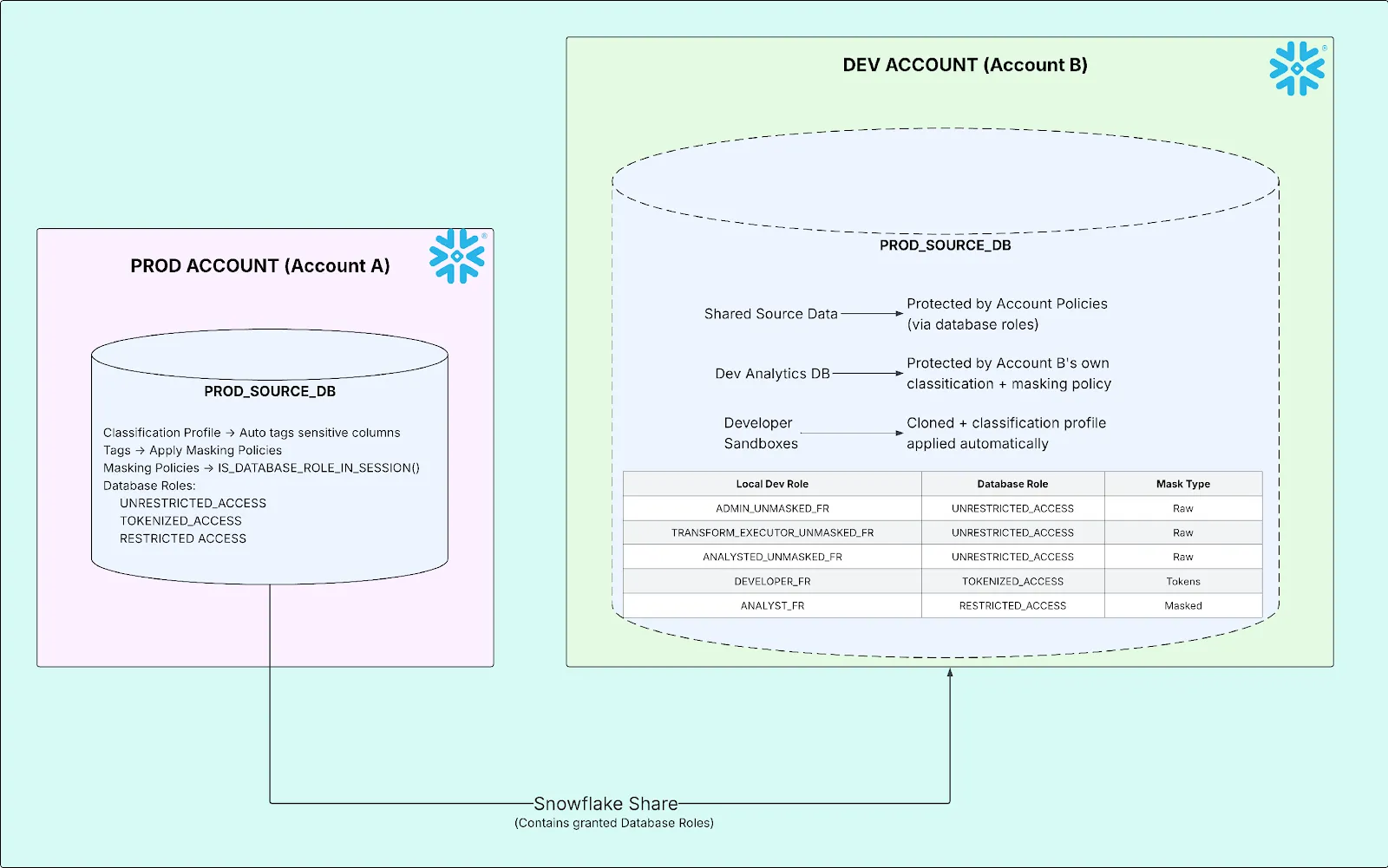
Outcomes
After deploying this architecture, engineers build and test against realistic data. Joins produce correct cardinality, aggregations return actual numbers, and date-based logic works. Admins see raw data unchanged. Restricted analysts see only what compliance allows. Every column across every database is continuously scanned and automatically protected; new tables are classified within hours without manual tagging. Adding a new role, provisioning a new sandbox, or creating a new dbt model requires no masking policy changes. The naming convention and automatic classification handle it.
Closing thoughts: masked data that’s still useful
The hard part of data masking is keeping the masked data useful. Most organizations treat masking as binary: you see the data or you don’t. That framing forces a choice between security and productivity.
The three-tier approach (raw, tokenized, and fully masked) rejects that. “Useful” means different things to different people. The right level of obfuscation depends on what you’re trying to do with the data.
None of this is obvious the first time you encounter it. The database role mechanism is the load-bearing piece — without it, there’s no clean way to vary masking behavior based on a consumer account’s role hierarchy. Classification profiles build on top of that, closing a specific failure mode that only reveals itself in a multi-account environment.
Masked data that’s still useful. That’s harder than it sounds.