


Snowflake CoCo (CoCo) vs. Databricks Genie Code: A Friendly Face-Off of AI-Powered Data Assistants
AI-powered development assistants are quickly becoming part of the modern data team’s toolkit. They can help generate code, explain logic, accelerate pipeline development, and support teams as they build more reliable data and AI workflows.
Snowflake CoCo, previously known as Snowflake CoCo, is Snowflake’s AI-powered coding assistant designed to help teams accelerate development inside the Snowflake ecosystem. Databricks Genie Code reflects a similar shift toward AI-assisted development within the Databricks environment.
Both tools reflect a larger shift toward making data engineering, analytics, and AI workflows faster, more intuitive, and easier to manage. But rather than treating this as a winner-take-all comparison, the more useful question is this: where does each assistant fit, and where does Snowflake CoCo create meaningful value for teams already invested in Snowflake?
For organizations building on Snowflake, CoCo offers a compelling path forward. Its SQL-first experience, native alignment with Snowflake’s governance model, and connection to Snowflake Cortex AI make it especially well-suited for teams that want to accelerate development without moving away from the Snowflake environment.
Two Assistants, Two Platform Philosophies
Snowflake CoCo is rooted in Snowflake’s cloud-native, SQL-first data platform. It is designed to support users directly within the Snowflake ecosystem, helping teams work with data, generate code, troubleshoot logic, and take advantage of native AI capabilities through Cortex.
For teams that already rely on Snowflake for analytics, data engineering, governance, and AI workloads, this creates a streamlined experience. Users can stay close to the data, work in a familiar SQL-first environment, and take advantage of AI assistance without introducing unnecessary complexity.
Databricks Genie Code reflects the Databricks Lakehouse approach. It is built around the Databricks environment, where notebooks, Spark, Delta Lake, Python, SQL, and ML tooling often come together. This can be a natural fit for teams with a strong data science or engineering culture that already works heavily in Databricks.
The distinction is less about one assistant replacing the other and more about how each one supports its underlying platform. Snowflake CoCo stands out when teams want AI-assisted development that feels native to Snowflake, especially for SQL-centric workflows and governed enterprise data environments.
Where Snowflake CoCo Stands Out
One of Snowflake CoCo’s strongest differentiators is how naturally it fits into the broader Snowflake experience. Teams can work in a familiar SQL-first environment while using AI assistance to generate code, troubleshoot logic, and accelerate development.
For many organizations, this matters. Not every data team wants to introduce additional tooling, move work into notebooks, or significantly change existing development patterns to take advantage of AI. CoCo helps reduce that friction by keeping users close to the platform they already use. Snowflake also extends this experience through CoCo CLI, allowing developers to leverage AI assistance directly from their local development environments.
Another area where CoCo stands out is its focus on simplicity and rapid adoption. It is particularly useful in scenarios where teams need faster solutions without dealing with overly complex setups. During testing, many AI and ML workflows could be implemented with fewer steps because Snowflake provides several AI capabilities as built-in platform features. For teams looking for a fast, SQL-centric path to AI adoption, this can help reduce implementation complexity.
Ultimately, CoCo is particularly appealing for organizations that want to extend existing Snowflake workflows with AI assistance while staying within a familiar platform experience.
Developer Experience and Workflow Support
Both assistants are designed to accelerate development by helping teams generate code, evaluate trade-offs, and move from idea to implementation more quickly. The key difference is not the goal itself, but the development workflows in which each assistant operates.
Databricks Genie Code is integrated directly into the Databricks platform, where users interact with it through browser-based experiences such as notebooks, the SQL Editor, and the Lakeflow Pipelines Editor. This aligns well with flexible, multi-language engineering workflows involving Python, Spark, and broader lakehouse architectures.
Snowflake CoCo extends this experience through CoCo CLI-based workflows. Running locally, CoCo can interact with a developer’s terminal, local codebase, and environment, enabling testing, automation, and integration with external engineering tools. CoCo is also tightly integrated with Snowflake’s SQL-centric development experience, making it particularly effective for data warehousing, analytics, and platform-native workflows. During testing, CoCo’s responses were generally more consistent with the available context, while some Genie workflows occasionally required additional prompting or clarification. For teams that rely on local development workflows, this can be a meaningful advantage beyond platform-based interactions.
Data Engineering and Modeling Support
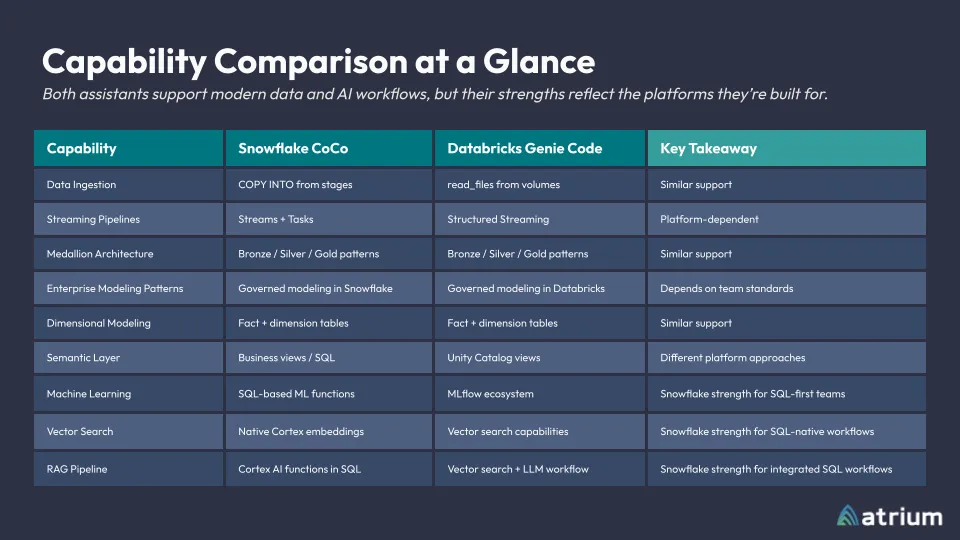
Both Snowflake and Databricks support modern data architecture patterns, including layered pipelines, governed data assets, and analytics-ready models. In practice, the right approach depends on an organization’s standards, platform investments, and team skill sets.
Both assistants leverage platform context and metadata to help users generate and refine logic within their existing data environments, enabling development around familiar datasets, schemas, catalogs, and modeling assets.
For Snowflake teams, CoCo integrates directly into the broader Snowflake experience. During evaluation, CoCo’s responses were generally more consistent with the available context, while some Genie Code workflows occasionally required additional prompting or clarification to reach the intended outcome.
Rather than focusing on a specific modeling methodology, CoCo helps teams apply existing standards more efficiently inside Snowflake. Whether working with dimensional models, incremental pipelines, semantic layers, or AI-ready datasets, teams can accelerate development while keeping Snowflake at the center of the workflow.
AI, ML, and RAG Workflows
Snowflake’s native AI capabilities are one of the clearest areas where CoCo becomes especially valuable.
This is where the differences between the two platforms become more noticeable. Both Snowflake and Databricks support RAG, vector search, text generation, forecasting, anomaly detection, and broader AI-assisted development. The distinction is less about capability and more about implementation style.
For SQL-first teams, Snowflake’s approach is often faster and more straightforward. Through Cortex AI and Snowflake ML, capabilities such as embeddings and forecasting are available through native functions like `EMBED_TEXT` and `SNOWFLAKE.ML.FORECAST`. During testing, CoCo frequently produced working AI and ML workflows with fewer steps because much of the required functionality was already available within Snowflake.
Databricks offers similar functionality through AI functions, vector search, Spark, and MLflow. However, Genie Code often took a more hybrid approach, combining built-in capabilities with generated Python code, similarity calculations, and custom workflow logic. While this flexibility is valuable for advanced AI, machine learning, and data science workloads, it sometimes requires additional prompting and introduces more complexity for smaller workloads or teams seeking quick implementation.
Ultimately, the tradeoff comes down to simplicity versus flexibility. Snowflake is particularly appealing for teams seeking a faster, plug-and-play path to AI and ML adoption, while Databricks offers a more extensible ecosystem for complex data science and machine learning solutions.
Governance, Access Control, and Cost Visibility
As AI assistants become more embedded in day-to-day development, organizations need to understand not only what these tools can do but also how they are being used, who is using them, and their impact on platform consumption.
Both Snowflake CoCo and Databricks Genie Code operate within the governance, security, and consumption frameworks of their respective platforms. This keeps AI-assisted interactions aligned with existing policies, access controls, auditing practices, and cost-monitoring mechanisms. Snowflake CoCo inherits governance from Snowflake’s RBAC model, where access is controlled through predefined roles and permissions. One advantage of this approach is its predictability and simplicity, particularly for organizations operating in highly governed, SQL-centric environments. Databricks Genie relies on Unity Catalog, which combines centralized governance with attribute-based controls, enabling policies to be applied dynamically across datasets, users, and domains. This provides greater flexibility for large-scale and diverse data environments. In both cases, the effectiveness of these controls depends on how well the underlying governance model has been implemented and maintained.
Both assistants are embedded within their respective ecosystems, allowing users to access AI capabilities within existing data and analytics workflows. For organizations already invested in Snowflake, CoCo extends existing workflows within a familiar platform experience.
Beyond governance and access control, organizations also need visibility into how AI usage translates into platform consumption and cost.
Snowflake measures AI usage through AI Credits, while Databricks typically tracks platform consumption through Databricks Units (DBUs). Both provide visibility into usage and costs through their respective consumption models. For Snowflake users, AI Credits align AI-related consumption with the same operational and billing framework used across the platform.
Rather than treating AI assistance as a separate layer, Snowflake integrates AI capabilities into the workflows and operational models already used across the platform.
How the Experiences Compare
Snowflake CoCo and Databricks Genie Code both aim to help teams accelerate data and AI development, but they do so through the lens of their respective platforms.
Snowflake CoCo is especially strong for teams that:
- Work primarily in Snowflake
- Prefer SQL-first development
- Want AI assistance close to governed enterprise data
- Need clear access control and usage visibility
- Want to take advantage of Snowflake Cortex AI capabilities
- Value a streamlined experience across data engineering, analytics, and AI workflows
Databricks Genie Code is well aligned with teams that:
- Already work heavily in the Databricks environment
- Use notebooks as a primary development interface
- Rely on Spark, Python, SQL, and Delta Lake workflows
- Have data science or machine learning teams already standardized on Databricks tooling
- Prefer collaborative notebook-based experimentation
Both approaches have value. The best fit depends on the platform strategy, team structure, governance requirements, and development patterns already in place.
For Snowflake-first organizations, the value of CoCo is clear: it brings AI-assisted development directly into the platform where teams are already building, governing, and scaling their data work.
What This Means for Modern Data Teams
Snowflake CoCo and Databricks Genie Code both reflect where modern data platforms are headed: toward more intelligent, AI-assisted development experiences.
But for Snowflake-first organizations, CoCo offers a particularly compelling advantage. It brings AI assistance directly into the Snowflake experience, supports SQL-first development, aligns with Snowflake’s governance model, and helps teams take advantage of Cortex AI without leaving the platform.
That combination makes CoCo more than just a coding assistant. It becomes a practical accelerator for teams looking to build, govern, and scale data and AI workflows in Snowflake.
As with any fast-moving AI capability, features and platform behavior will continue to evolve. Teams should validate functionality against their current environment, governance requirements, and development standards before adopting any AI-generated code in production.