


Apache Iceberg: An Open Table Format for Data Lakes
The choice used to be reliability or flexibility: a warehouse you could trust, or a lake you could put anything in. Apache Iceberg is what closed the gap, and the gap is worth understanding first.
For years, organizations relied on data warehouses to store and analyze data. These systems worked well because the data was clean, structured, and carefully organized before it ever got loaded in. The downside was that everything had to be modeled and cleaned upfront, which made warehouses less suitable as data became more diverse.
That’s exactly what started happening as businesses grew. Web applications started generating logs, mobile apps generated events, IoT devices streamed sensor data, and teams started collecting images, videos, JSON, and a dozen other formats that didn’t fit neatly into a warehouse schema.
This is what gave rise to the data lake: a place to store almost any kind of data, in its raw form, without cleaning or modeling it first.
So now there were two extremes:
Warehouses were reliable and well-managed but rigid and designed primarily for structured data. Data lakes were flexible and cost-effective but, as we’ll soon discover, made it difficult to manage data after it was stored.
To solve this problem, the industry gradually moved toward:
Data lakehouse: an architecture that combines the flexibility and low cost of a data lake with the reliability and governance of a data warehouse. Data warehouses optimize data before storing it. Data lakes optimize storage before understanding it.
So why do we even need Apache Iceberg?
At first, the data lake felt like the answer to everything. Storage got cheap, ingestion got fast, and “store now, figure it out later” became the default.
But a new problem soon appeared, and it wasn’t a storage problem. It was a management problem.
Picture a company with millions of files sitting in S3. The data is technically all there, but try answering these:
- Which files actually belong to a particular table?
- Which version of the data is the current one?
- What happens when the schema changes?
- Can you update or delete rows safely, without breaking something downstream?
- Can two teams write to the same dataset at the same time without stepping on each other?
A data lake solved storage. Apache Iceberg solved data management.
Why these questions are so hard to answer
Before Apache Iceberg, large datasets in cloud storage were commonly managed using the Hive table model. A typical Hive table was organized as a set of folders, where each partition was stored in its own directory.
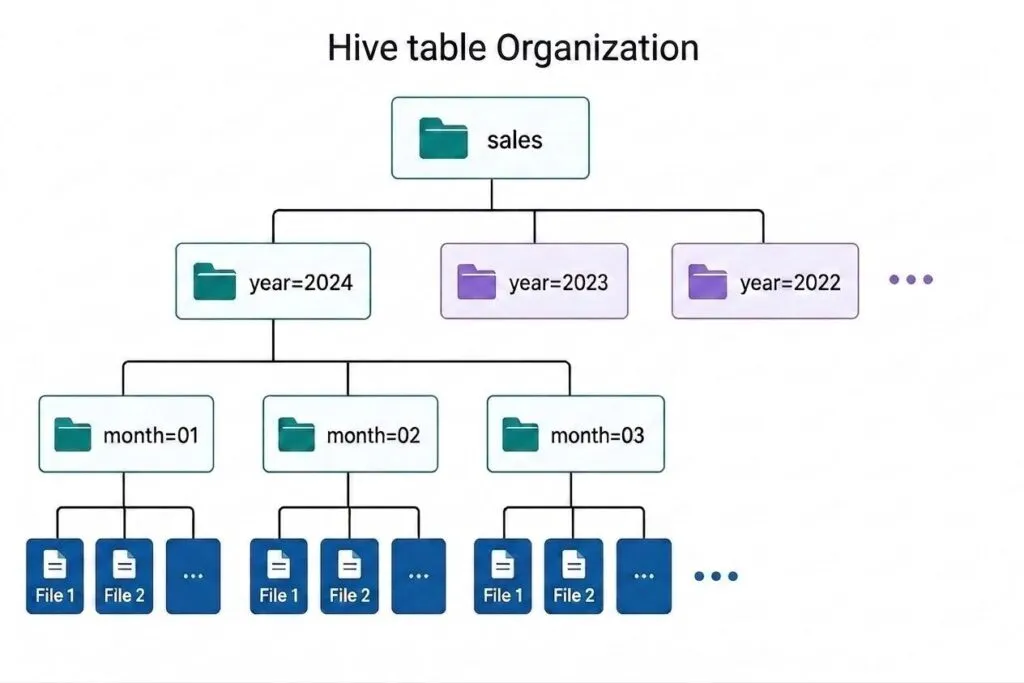
In simple terms, Hive relied on the physical folder structure to organize and locate a table’s data. That created three concrete problems:
- Finding your own data was slow: To answer “which files belong to this table,” an engine had to ask a separate metastore database for partition locations, and then scan folders in cloud storage to see what was actually there. This worked for a few hundred partitions but became very slow when the number of partitions grew, because that listing step can take longer than running the actual query.
- There was no good partitioning strategy: Partition by something with too many unique values (like a user ID) and you get thousands of small folders that are expensive to scan. Partition too broadly and you get the opposite problem: too many files in a single partition in each folder, which slows down every future scan that touches them.
- “Updating data safely” barely existed: Updating data was difficult. Even a small update often required copying an entire partition before replacing the old version. If two pipelines updated the same table at the same time, one change could overwrite the other without warning.
From storable to trustworthy
Several open table formats emerged to solve this challenge, and Apache Iceberg eventually became one of the most widely supported.
Meet Apache Iceberg
Apache Iceberg is an open table format built for large-scale analytics. “Table format” might sound complicated, but the idea is actually simple. Iceberg is a metadata layer that helps query engines understand how individual data files belong to a single table. Iceberg doesn’t replace your data or your storage. The layering looks like this:
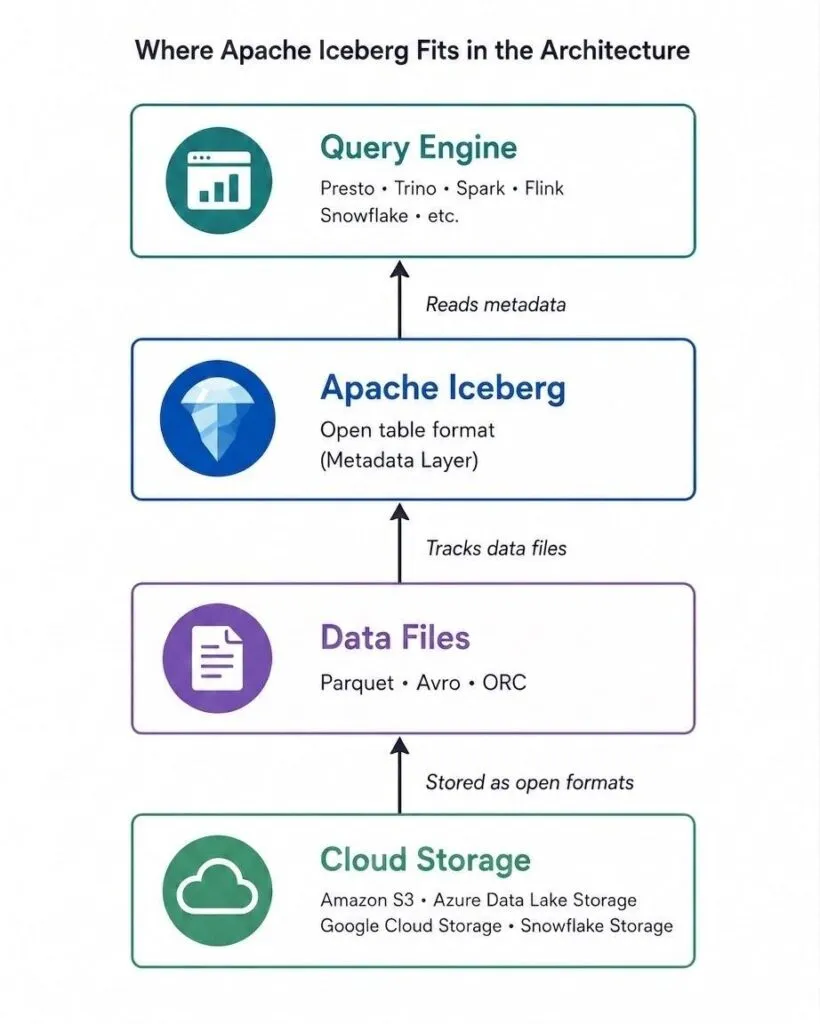
Your data is still stored in open file formats such as Parquet, Avro, or ORC, inside cloud storage like Amazon S3, Azure Data Lake Storage, Google Cloud Storage, or Snowflake-managed storage. Iceberg sits between the storage layer and the query engine, keeping track of how those files make up a table.
Apache Iceberg doesn’t store your data. It organizes and manages it.
It may seem like a small change, but this metadata layer solves all the problems we discussed earlier.
How Iceberg actually keeps track of everything
Think about your phone’s photo gallery. If thousands of photos were stored randomly without albums, dates, or tags, finding a specific photo would be difficult. What makes the gallery useful isn’t the photos themselves. It’s how they’re organized.
Apache Iceberg works in a similar way. It organizes data using several layers of metadata.
- Catalog: like the gallery app. It knows where the latest version of every table is stored.
- Metadata file: like an album’s master record. Stores the table’s schema, partition details, and the list of available snapshots.
- Manifest list: like an index of pages in that album. For one snapshot, it lists which manifest files make it up, along with rough summaries of what each one contains.
- Manifest files: the individual page entries. List the data files in the snapshot and store useful information, such as the minimum and maximum values in each file.
- Data files: the actual photos. The Parquet, Avro, or ORC files that store your data.
When a query engine wants to read the table, it doesn’t scan cloud storage blindly. It walks down this structure (catalog → metadata file → manifest list → manifest files), and at each step, it can skip unnecessary files using the statistics already stored there. Only then does it open the actual data files it truly needs.
Iceberg doesn’t search for files. It follows metadata.
How Iceberg solves the challenges
Apache Iceberg uses metadata to solve many of the problems found in traditional data lakes.
- Finding the right files no longer requires a folder scan. Iceberg uses metadata and manifest files to locate them instead.
- Tracking the current version becomes reliable because the catalog always points to the latest snapshot, making it easy to identify the current version of the table.
- Schema changes are stored in metadata, so new columns or changes can be added without rewriting existing data.
- Safe updates are achieved by creating new snapshots instead of changing existing data.
- Concurrent writes are protected. If two teams write to the same table at the same time, Iceberg detects the conflict and prevents one write from silently overwriting the other.
Another advantage is Time Travel. Since older snapshots are preserved, you can query the table as it existed at an earlier point in time without creating separate backups.
Watching a snapshot get created
We’ve seen the different components. Now let’s see how they work together when new data is written.
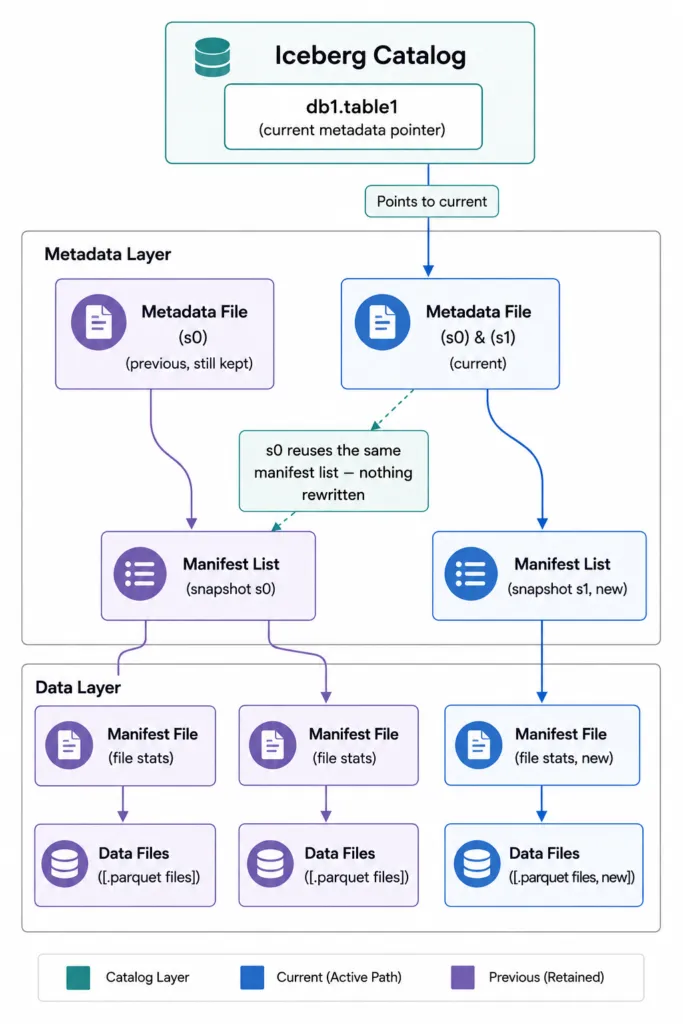
- The table starts with snapshot s0, which represents the current version of the data.
- When new data is written, Iceberg creates a new snapshot (s1) instead of modifying the existing one.
- Iceberg reuses existing metadata and manifest files, creating new ones only for the changes.
- After the write is complete, the catalog updates its pointer to snapshot s1.
- The previous snapshot (s0) is preserved, making Time Travel and rollback possible.
How Iceberg applies updates
Creating a new snapshot is only part of the process. Iceberg also needs to update the actual data files, and it does this in two different ways depending on the workload.
Copy-on-Write vs. Merge-on-Read
The first is Copy-on-Write (CoW). Here, when rows are updated or deleted, Iceberg rewrites the affected data files with the new changes. The old files remain part of the previous snapshot, while the new snapshot points to the newly written files.
The second approach is Merge-on-Read (MoR). Instead of immediately rewriting data files, Iceberg records the changes separately using delete files. During query execution, the engine combines the original data files with these delete files to produce the latest view of the table.
| Aspect | Copy-on-Write (CoW) | Merge-on-Read (MoR) |
| How updates are applied | Rewrites the affected data files with the changes. | Stores changes separately in delete files without immediately rewriting data files. |
| Write Performance | Slower, because data files are rewritten. | Faster, because only delete files are written. |
| Read Performance | Faster, since queries read only the latest data files. | Slightly slower, because queries combine data files with delete files. |
| Best suited for | Analytics workloads with frequent reads. | Workloads with frequent updates and deletes. |
The tradeoff will feel familiar to anyone who has chosen between a full refresh and an incremental strategy in dbt: you are deciding where to pay the cost, on write or on read.
Hidden Partitioning: one of Iceberg’s biggest advantages
In traditional Hive tables, users had to understand how the data was physically partitioned. Choosing the wrong partitioning strategy could slow down queries and make future changes difficult.
Apache Iceberg solves this with Hidden Partitioning. Users don’t need to know how the data is partitioned. Iceberg stores this information as metadata and automatically skips unnecessary files during queries. As a result, users can write simple queries while Iceberg decides which files need to be read.
Iceberg also supports Partition Evolution. This means you can change the partitioning strategy, for example from monthly to daily, without rewriting existing data. Older and newer partitions continue to work together as a single table.
Keeping an Iceberg table healthy in production
Time Travel is useful, but production systems don’t keep every snapshot forever. As a table grows, keeping old snapshots for too long increases metadata and storage usage. Snowflake leans on the same idea: because micro-partitions are immutable, Snowflake zero-copy cloning can hand every team its own environment without duplicating storage.
To keep tables efficient, Iceberg supports routine maintenance operations.
Snapshot Expiration removes old snapshots that are no longer needed. Once a snapshot is removed, any data files that are no longer being used can also be deleted, preventing storage from growing indefinitely.
Another common maintenance task is Compaction. Frequent writes can create many small data files. Reading thousands of small files is slower than reading a few larger ones. Compaction combines these small files into larger ones, improving query performance without changing the data itself.
Think of it like cleaning up your photo gallery. Over time, you might delete old albums you no longer need and group scattered photos into fewer, organized albums. The photos themselves haven’t changed. Only the way they’re organized has improved.
Building your first Iceberg table on Snowflake
Snowflake supports Iceberg tables natively, and Snowflake’s own walkthrough, Tutorial: Create your first Apache Iceberg table, is the cleanest way to see this in action. Here’s the shape of it.
1. Create an external volume. An external volume tells Snowflake where your Iceberg data and metadata are stored, such as an Amazon S3 bucket, Azure Data Lake Storage, or Google Cloud Storage.
2. Choose a catalog. The catalog manages the Iceberg table metadata. In this example, Snowflake acts as the catalog, making it the simplest option to get started.
3. Create the table. Once the storage and catalog are configured, creating an Iceberg table looks very similar to creating a regular Snowflake table.
CREATE OR REPLACE ICEBERG TABLE nation_iceberg (
    n_nationkey INTEGER,
    n_name STRING
)
BASE_LOCATION = 'nation_iceberg'
AS SELECT n_nationkey, n_name
FROM snowflake_sample_data.tpch_sf1.nation;
4. Use it like any other table. INSERT INTO, joins against native Snowflake tables, DELETE. All of it works exactly as expected. Snowflake automatically uses Iceberg metadata behind the scenes, so working with an Iceberg table feels just like working with a regular Snowflake table.
5. Peek under the hood. After inserting data, check the storage location. Alongside your Parquet files, you’ll also see Iceberg metadata and manifest files, showing how the table is organized.
For the complete setup, permissions, and SQL examples, refer to Snowflake’s official Apache Iceberg tutorial.
Getting an Iceberg table into production is more than a CREATE statement. External volumes, catalog choice, and a maintenance cadence all need decisions, and that is the kind of work our Snowflake data engineering team does every week.
What Iceberg is actually faster than
One important thing to keep in mind is the kind of performance Iceberg claims. An open spec is a tradeoff by design. A proprietary engine that controls its storage format end to end can optimize in ways a portable format can’t, so Iceberg isn’t trying to beat it. What Iceberg beats is the traditional way of managing data lakes, where systems relied on directory scanning, metastore lookups, and rewriting entire partitions. That’s the bar it cleared, and it’s a meaningful one as soon as a table has more partitions than an engine can afford to list.
The takeaway
A data lake gave organizations a place to put anything. Apache Iceberg is what makes that place reliable enough to actually call it a table: versioned, queryable, safely updatable, and accessible from multiple query engines. It’s not magic, and it’s not a replacement for every table you own. It’s a metadata layer, built for exactly the moment a folder full of files stops being good enough.
The teams that get the most out of Iceberg won’t be the ones that convert every table fastest. They’ll be the ones that can say which tables need versioning, which need concurrent writes from more than one pipeline, and which were fine as they were. That’s an architectural decision, not a technical one, and it’s worth making deliberately before the first CREATE statement.