


Zero-Copy Cloning: Instant Sandboxes Without the Storage Explosion
TLDR/key takeaways:
- Snowflake zero-copy cloning creates a full, writable copy of a table, schema, or database without duplicating the underlying data, because the clone’s metadata points at the same micro-partitions the source already uses.
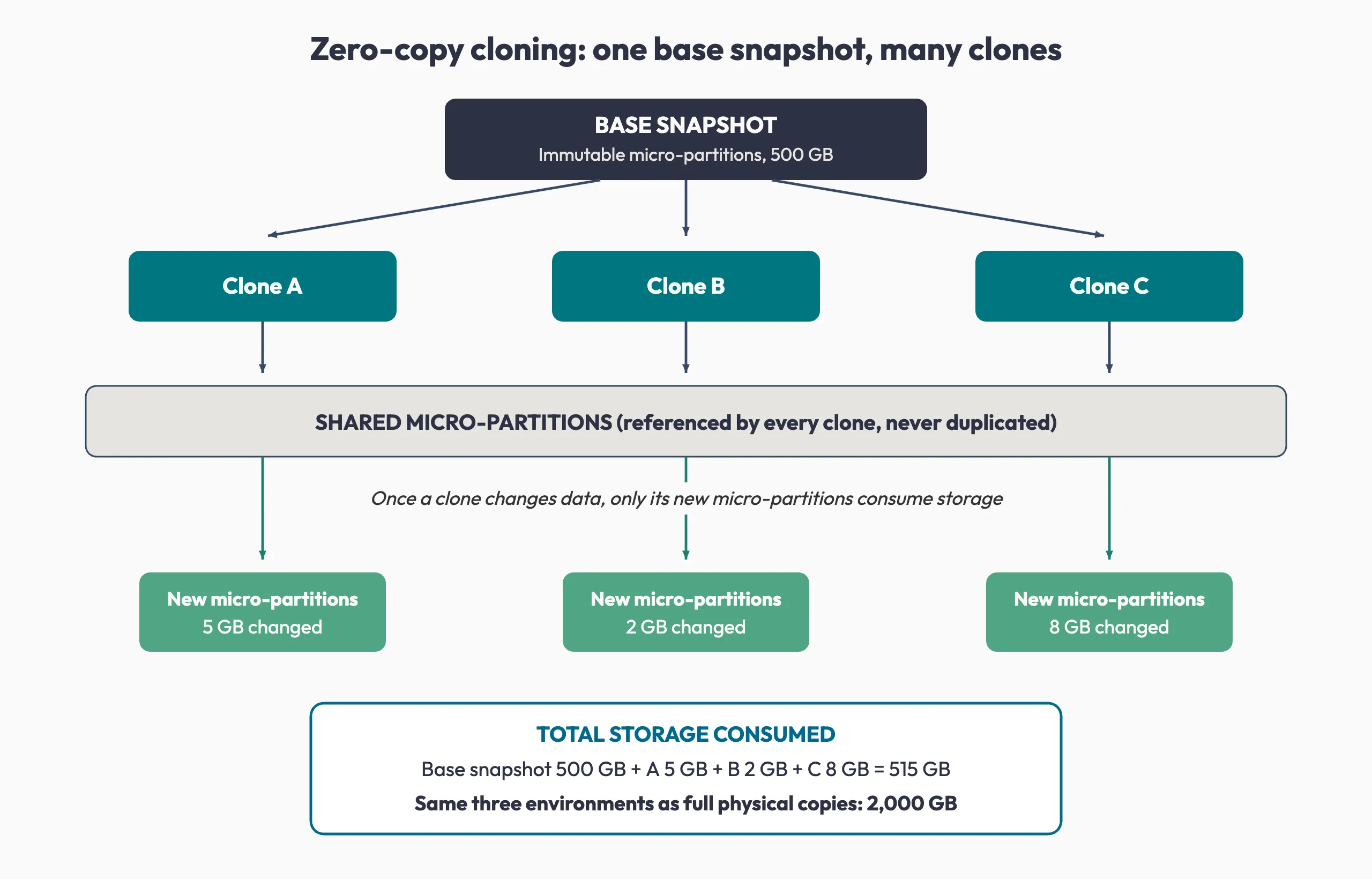
- A Snowflake clone adds nothing to storage until data inside it changes, so twenty test environments built from one 500 GB dataset start at close to the storage footprint of one.
- Cloning is a metadata operation rather than a data movement operation, which is why creating and dropping an environment is fast enough to sit inside a CI/CD pipeline run.
- Zero-copy cloning has real boundaries: external tables are not cloned, privileges do not carry over unless you ask for them, and the savings land on storage, not compute.
So what is actually happening when a clone of a 20 TB table finishes in seconds?
Every team wants its own copy of production data, and every copy lands on the bill. Developers need an environment to build in, QA needs the same data every time it tests, data engineers need somewhere safe to run a pipeline, and AI teams need full-size datasets to train against. Backup and compliance add more copies on top.
Most organizations solve this by making full physical copies. Snowflake zero-copy cloning solves the same problem from the other direction: every team gets an independent environment, and the data itself stays in one place. At terabyte scale, the gap between those two approaches becomes one of the larger line items on the platform.
The timing matters. Flexera’s 2026 State of the Cloud Report, a survey of more than 750 cloud decision-makers, found that estimated wasted cloud spend rose to 29%, the first increase in five years. Storing the same dataset ten or twenty times is exactly the kind of cost that accumulates without anyone ever approving it.
Why test environments are really a data storage problem
The bottleneck is not environment creation, it is data duplication. Spinning up infrastructure is a solved problem. Filling it with realistic data is the part that takes hours and shows up on an invoice every month afterward.
The arithmetic is unforgiving. One 500 GB production dataset, twenty teams that each want a copy, and you store 10 TB to test against 500 GB of real information. Add a second dataset and the multiplier compounds. The question worth asking is not “how fast can we create environments?” but “how many times are we willing to store the same bytes?”
How Snowflake zero-copy cloning actually works
A clone is a new object whose metadata points at the storage the source is already using, so no data moves when you create one. Why that works comes down to how Snowflake stores a table in the first place.
Snowflake does not keep a table as one large file. It divides table data into micro-partitions, each holding between 50 MB and 500 MB of uncompressed data, stored in columnar format. Once written, a micro-partition is never edited in place, the same immutable-snapshot idea behind Apache Iceberg’s open table format.
That immutability is the whole trick. When you clone a table, schema, or database, Snowflake creates a new object with metadata referencing the same micro-partitions. Zero bytes are copied. When something changes on either side, an INSERT, UPDATE, DELETE, or MERGE, Snowflake writes new micro-partitions and repoints that object’s metadata at them. The old ones stay in place, which is also what makes Snowflake Time Travel possible.
Two consequences follow. First, a clone is writable and fully independent of its source: changes made to one are not reflected in the other. Second, a clone does not contribute to storage until operations modify or add data, so you pay for the delta and nothing else.
A clone is a pointer, not a copy. Because the work happens in metadata rather than in storage, clone time is governed by metadata volume instead of table size.
What cloning changes for CI/CD pipelines
Continuous integration is where this pays off fastest, because test environments are created constantly, live briefly, and use nearly identical data. Physical copying spends time and money provisioning storage, duplicating databases, restoring snapshots, and moving bytes across a network. Cloning removes all four.
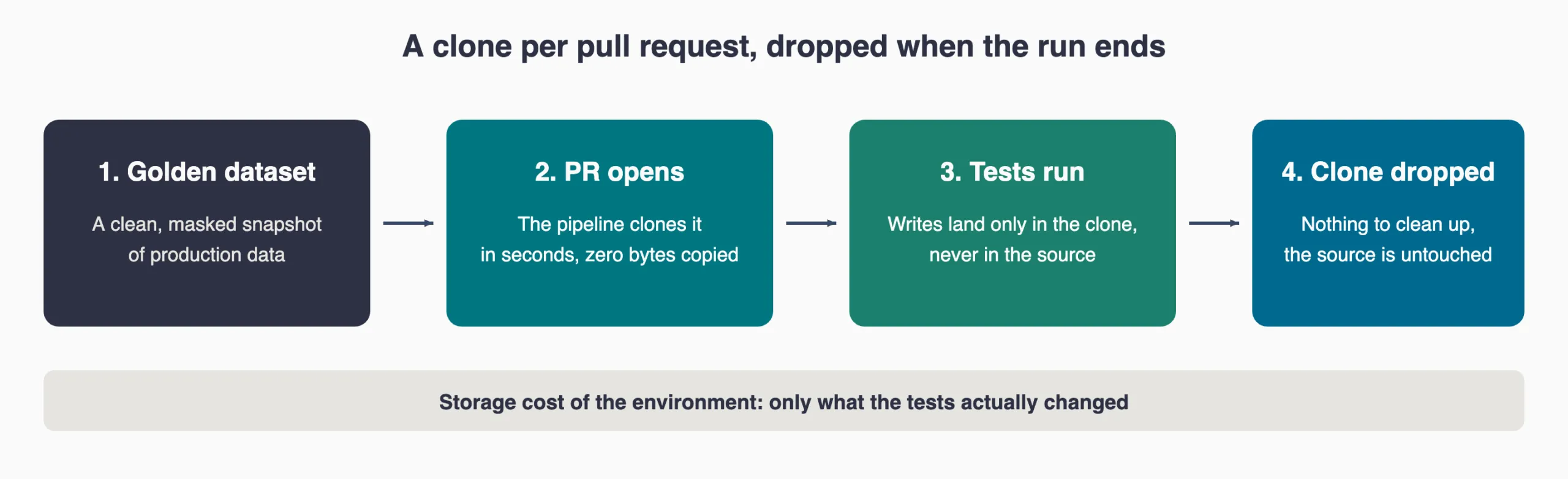
The working pattern is four moves:
- Maintain a golden dataset. A clean, masked snapshot of production that serves as the safe starting point for every environment, so nobody tests against live customer records.
- Clone on pull request. When a PR opens, the pipeline clones the golden dataset into a fresh environment.
- Test in isolation. Each environment is independent, so a destructive test damages nothing but its own clone.
- Drop the clone. When the run finishes, the environment is deleted. The source was never touched, so there is no cleanup to do.
The same pattern underpins AI-assisted data engineering work, where generated pipeline code needs a full-size environment to validate against before anyone trusts it.
Fraud detection at 20 TB: what changes when nothing is copied
Picture a bank whose transaction history is a 10,000 page ledger. The fraud team cannot write fake attacks into the real ledger, so the old answer was to photocopy all 10,000 pages and carry a second stack into the test room. That cost hours to produce, real money to store, and time on every new fraud pattern, because a test that takes days to set up means a fix that takes days to ship.
Now put numbers on it: a payments company testing a new fraud model against 20 TB of historical transactions.
| Step | Physical copy | Zero-copy clone |
|---|---|---|
| How it works | Duplicates all 20 TB | Points at the existing micro-partitions |
| Storage used | 20 TB per team | Only what each team changes |
| Time to first test | Hours of waiting | Seconds to minutes, depending on metadata volume |
| Ten teams | 200 TB of extra storage | One shared copy plus each team’s deltas |
The natural objection is what happens when several teams write to the same underlying data. They cannot corrupt each other, because nobody is writing to shared bytes. A test transaction written into a clone produces new micro-partitions belonging to that clone, and every other environment keeps reading what it read before.
Where zero-copy cloning stops
Cloning is a metadata operation, and most of its limits follow from that. These are the ones that surprise teams in production:
- Not everything comes along. Cloning a database or schema does not clone external tables, and pipes pointing at internal Snowflake stages are skipped. Pipes on external stages are cloned but arrive paused so they do not double-ingest.
- Privileges do not follow by default. Most CREATE … CLONE statements do not copy grants. Use the COPY GRANTS clause, or plan to re-grant on the clone.
- Scheduled work arrives switched off. Tasks and alerts in a cloned database or schema are suspended by default, which is protective rather than a defect. Resume them deliberately.
- Fast is not instant. Snowflake’s own documentation is direct about this: cloning is fast but not instantaneous, particularly for large objects, and DDL running against the source mid-clone can produce surprises.
- It stays inside the account. Cloning operates within a Snowflake account. Moving data to another account or region is a different feature, replication, with its own cost and behavior.
- Storage is free, compute is not. A clone costs nothing to hold, but querying it burns credits like any other workload. Pair cloning with warehouse discipline: right-size, auto-suspend, and watch usage.
The bigger picture
For years, teams bought their way to speed with faster infrastructure. The constraint has moved. What slows delivery now is rarely computation, it is the time and money spent moving and duplicating data that already exists.
Zero-copy cloning is a small change in mechanism and a large change in posture: instead of building bigger systems to hold more copies, you stop making the copies. That is the same trade we help data and platform teams make, and it is how Atrium has delivered $1B in measured customer impact.
As datasets grow, this stops being an optimization and becomes a design assumption. The teams that pull ahead will not be the ones with the largest environments. They will be the ones that stopped paying to store the same data twice.
Frequently asked questions
What is zero-copy cloning in Snowflake?
Zero-copy cloning creates a new table, schema, or database that references the same underlying micro-partitions as the source object instead of duplicating the data. The clone is writable and independent, and it only consumes storage once data inside it is modified or added.
Does a Snowflake clone cost extra storage?
Not at creation. A clone does not contribute to data storage until operations modify existing data or add new data to it. From that point, you are billed for the changed or added micro-partitions, not for a second full copy.
How long does it take to clone a large table in Snowflake?
Usually seconds, because the work is metadata rather than data movement. Snowflake notes that cloning is fast but not instantaneous, and objects with very large metadata volumes or heavy concurrent DML take longer.
Can you clone across Snowflake accounts or regions?
No. Cloning works within a Snowflake account. To move data to another account or region, use replication, which does copy data and bills accordingly.
Do permissions carry over to a clone?
Not automatically for most objects. Use the COPY GRANTS clause to copy explicit privileges from the source, otherwise the role that creates the clone owns it and you grant access from there.
Ready to stop paying to store the same data twice?
Cloning is one decision inside a larger set: how environments are provisioned, where golden datasets live, how masking is handled, and what your warehouses cost while all of it runs. Our Snowflake data engineering team works on exactly that, turning platform habits into measurable cost and cycle-time improvements.