


How to Evaluate AI Agents on Snowflake: A Practical Guide to Cortex Agent Evaluations
TLDR/key takeaways:
- Cortex Agent evaluations are Snowflake’s built-in way to score a native Cortex Agent against a test dataset, using LLM judges that run inside your Snowflake account.
- Snowflake’s Goal-Plan-Action (GPA) framework scores each stage of an agent’s reasoning (tool selection, tool execution, final answer, and logical consistency) instead of grading only the final answer.
- On the TRAIL/GAIA benchmark, Snowflake reports that GPA judges caught 95% of human-annotated agent errors, compared with 55% for baseline judges.
- A useful evaluation dataset starts with a handful of real queries tied to business risk, with ground truth written as a plain-language rubric and anchored to fixed dates.
How do you prove whether your last agent change helped?
You change your agent’s instructions, run the questions you always check, and it looks fine. Two weeks later someone flags a wrong answer nobody can explain. That is when eyeballing responses stops being enough: there’s no number to defend a change with, and no way to catch a regression before a user does.
Cortex Agent evaluations close that gap. Snowflake made the feature generally available on March 13, 2026. It runs your agent against a test dataset, traces every step, and scores the trace with LLM judges, all inside your Snowflake security boundary. It works for agents built on Cortex Analyst, Cortex Search, web search, and custom tools.
If you can’t say whether your last change helped or hurt, and by how much, you need evaluation. It usually comes up at one of these points:
- Before the first production release, so “ready” means a baseline score, not a handful of manual tests.
- After any agent change: a new instruction, a modified tool, a changed semantic view, or a different orchestration model.
- As a CI/CD gate that blocks a pull request when key metrics regress.
- When choosing an orchestration model. Snowflake’s best practices guide suggests running once with a top model, such as the latest Claude Opus, to find your ceiling, then testing a cheaper model against it. If the cheaper one lands close, ship it.
- On a schedule once the agent is live, to catch drift you didn’t cause.
Below: how the scoring works, how we evaluated one of our own agents, and how to build, run, read, and operationalize an evaluation.
How Cortex Agent evaluations score each step of an agent
Grading only the final answer misses the failures that matter most in a multi-step agent. An agent can call the wrong tool, feed it a garbled query, or ignore an instruction and still land on a plausible answer by accident.
Snowflake’s Goal-Plan-Action (GPA) framework scores every stage instead. The goal is what the user asked, the plan is which tools the agent chooses, and the action is what it actually does with them. In Snowflake’s announcement, GPA judges captured 95% of human-annotated errors on the TRAIL/GAIA benchmark (versus 55% for baseline judges) and localized errors to the right trace span with 86% accuracy. The method is detailed in Snowflake AI Research’s Agent GPA paper.
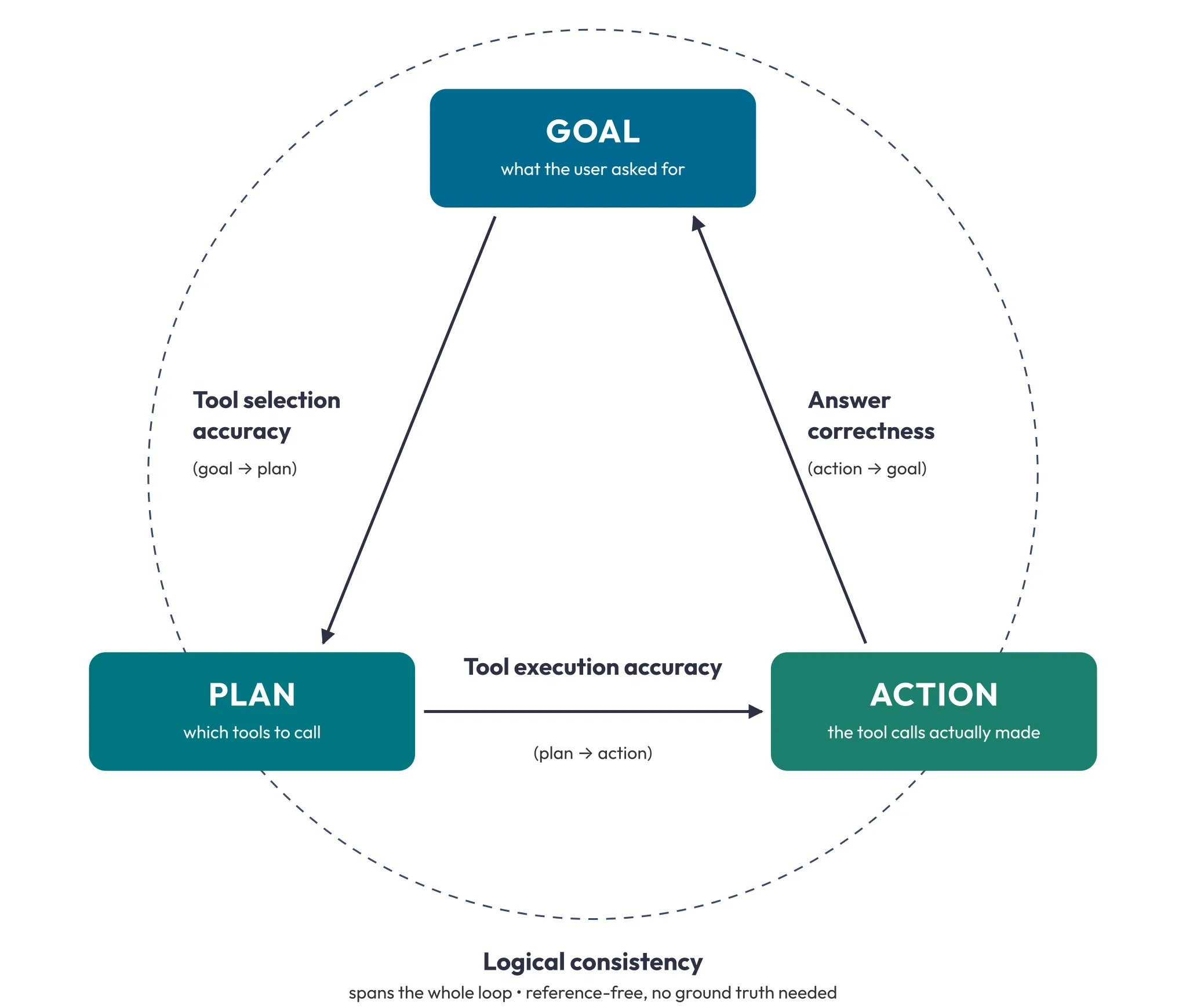
Each transition in the loop gets its own metric:
| Metric | Stage | Needs ground truth? | What it checks |
|---|---|---|---|
| Tool selection accuracy (TSA), Public Preview | Goal → Plan | Yes | Matched tools ÷ max(expected, actual), so too few, too many, and wrong calls all cost points. Order doesn’t matter, and no LLM judge is used. |
| Tool execution accuracy (TEA), Public Preview | Plan → Action | Yes | Did each expected tool get sensible input and return acceptable output? An expected tool that was never called scores zero. Extra calls are TSA’s job. |
| Answer correctness | Action → Goal | Yes | Does the streamed reply match the expected answer? Charts are checked on their underlying data, not the rendered image. |
| Logical consistency | Whole loop | No | Is the agent internally consistent, with no contradictions or ignored instructions? It’s reference-free, which makes it the easiest metric to turn on. |
TSA and TEA are in Public Preview but available to every account, so expect them to change shape.
Pin your metric version, because each version pins a judge model and scores across versions aren’t comparable. The judge runs through cross-region inference:
- v1: claude-4-sonnet, which reached end of life on October 14, 2026
- v2: claude-sonnet-4-5, or openai-gpt-5.2 for accounts that can’t use Anthropic models
- v3: claude-sonnet-4-6, or openai-gpt-5.4, with a context window of about 1M tokens for long traces
Because claude-4-sonnet is past end of life, metrics pinned to v1 no longer run. Set the version explicitly, ideally v3 as Snowflake recommends, rather than relying on the default, which Snowflake is changing from v1 to v3.
How we evaluated a sales intelligence agent
Before writing a single test question, decide what “trustworthy” means for this agent in business terms. Here’s how we did that with one of our own agents.
LEAD_KPI_AGENT is a sales intelligence agent we built at Atrium on Cortex Agents. It sits on one Cortex Analyst semantic view with ten logical tables, including PIPELINE_SUMMARY, DEAL_HYGIENE, REP_PERFORMANCE, and FISCAL_TRENDS. It has hard routing rules (aggregate totals come from PIPELINE_SUMMARY, deal-level lists from DEAL_HYGIENE, rep breakdowns from REP_PERFORMANCE) and explicit refusal logic for out-of-scope topics like quotas, commissions, and headcount. (Evaluation assumes the semantic view underneath is sound. If it isn’t, start with data readiness for Snowflake CoWork.)
We picked three KPIs that would tell us whether it was ready for a VP of Sales:
- Pipeline accuracy. These are the numbers that end up in board decks. We ran the core pipeline queries manually against PIPELINE_SUMMARY, recorded the exact values, and used them as our first ground truth entries.
- Routing discipline. An aggregate question should hit PIPELINE_SUMMARY, not DEAL_HYGIENE. Routing to the wrong table doesn’t just return a bad number. It returns a convincing wrong number. We wrote expected invocations naming the right table for each input and scored them with tool execution accuracy.
- Clean refusals. “What’s our quota attainment this quarter?” should be refused with no SQL generated. A fabricated answer here makes users distrust the correct answers too.
Each metric then shows exactly where trust breaks down. Answer correctness catches a pipeline number that’s off. Tool execution accuracy catches the agent querying DEAL_HYGIENE for an aggregate question, even when the number happens to land close. Logical consistency catches the agent ignoring its refusal rules. A score of 0.95 on correctness but 0.60 on consistency means the agent gets the right numbers but doesn’t follow its own rules, which is exactly the problem that surfaces at the worst moment in production.
How to build and run a Cortex Agent evaluation
An evaluation dataset is a table with two columns: the input query and a VARIANT holding the ground truth. The ground truth JSON has two keys, and you only fill in what your chosen metrics need:
- ground_truth_output is read by answer correctness. Write it as a plain-language rubric that states the correct value plus tolerances, units, date scope, and anything the answer shouldn’t contain.
- ground_truth_invocations is read by TSA and TEA. It’s an array of expected tool calls, each with a tool_name and, optionally, tool_input and tool_output described in free text. An empty array means no tools are expected, which is how you test refusals.
CREATE OR REPLACE TABLE agent_eval_data (
  input_query  VARCHAR,
  ground_truth VARIANT
);

INSERT INTO agent_eval_data
SELECT
  'What is the total deal value for fiscal year 2027 and quarter 3?',
  PARSE_JSON('{
    "ground_truth_output": "States total deal value for FY2027 Q3 as 5,009,413.00, matching the expected value exactly. Scope strictly to fiscal year 2027, quarter 3.",
    "ground_truth_invocations": [
      {"tool_name": "saleskpianalyst",
       "tool_input": "Total deal value for fiscal year 2027, quarter 3",
       "tool_output": "SQL selecting TOTAL_VALUE from FISCAL_TRENDS where FISCAL_YEAR = 2027 and FISCAL_QUARTER = 3"}
    ]
  }');
Where the test queries should come from
- Real user queries are the strongest source. Let people trial a prototype, or collect questions from future users.
- Production logs, once the agent is live. Cortex Code can build or extend the dataset from actual usage, and failures with negative feedback make especially good additions.
- Synthetic generation is the fallback. It’s the least representative source, so roll out more cautiously if it’s all you have.
Keep ground truth specific enough to catch real errors but loose enough that a differently worded correct answer still passes. Hand-check every entry, because an LLM-generated expected answer can be wrong too.
Three ways to run it
All three land in the same place. In the Snowsight UI, open the agent’s Evaluations tab, create a run, pick a dataset, choose metrics, and map columns. In SQL, call EXECUTE_AI_EVALUATION against a YAML config on a stage; it also accepts STATUS, CANCEL, and DELETE for polling from a pipeline. Or use Cortex Code, which builds the dataset and runs the evaluation conversationally.
CALL EXECUTE_AI_EVALUATION(
  'START',
  OBJECT_CONSTRUCT('run_name', 'run-1'),
  '@eval_db.eval_schema.metrics/agent_eval_config.yaml'
);
A minimal config has three top-level keys: dataset (drop it on repeat runs, or the run may fail because the dataset already exists), evaluation, and metrics.
# Creates the dataset from your table. Delete this block on repeat runs.
dataset:
  dataset_type: "CORTEX AGENT"
  table_name: "eval_db.eval_schema.agent_eval_data"
  dataset_name: "lead_kpi_eval_set"
  column_mapping:
    query_text: "input_query"
    ground_truth: "ground_truth"

# Which agent version to test, and which dataset to run it against
evaluation:
  agent_params:
    agent_name: "db.schema.LEAD_KPI_AGENT"
    agent_type: "CORTEX AGENT"
    agent_version: "VERSION$3"   # a committed version, not LIVE
  run_params:
    label: "Baseline run"
  source_metadata:
    type: "dataset"
    dataset_name: "lead_kpi_eval_set"

# What to score, with versions pinned
metrics:
  - name: "answer_correctness"
    version: "v3"
  - name: "logical_consistency"
    version: "v3"
  - name: "tool_selection_accuracy"
    version: "v3"
  - name: "tool_execution_accuracy"
    version: "v3"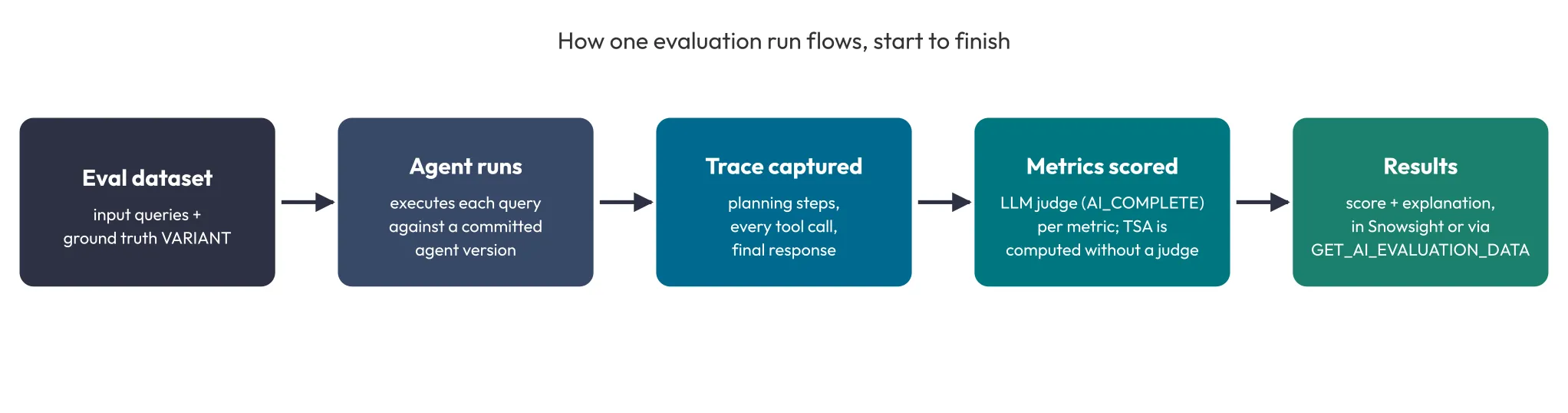
How to read Cortex Agent evaluation results
Snowsight shows trends first, then lets you drill into any single record. Each run gives you trend charts with the average score and change versus earlier runs, a per-input breakdown, record details split into three panes (evaluation results, thread details, and trace details), and a compare view for up to three runs side by side.
Programmatically, GET_AI_EVALUATION_DATA in SNOWFLAKE.LOCAL returns the full results for a run. GET_AI_RECORD_TRACE pulls the trace for one record, and GET_AI_OBSERVABILITY_LOGS surfaces warnings and errors.
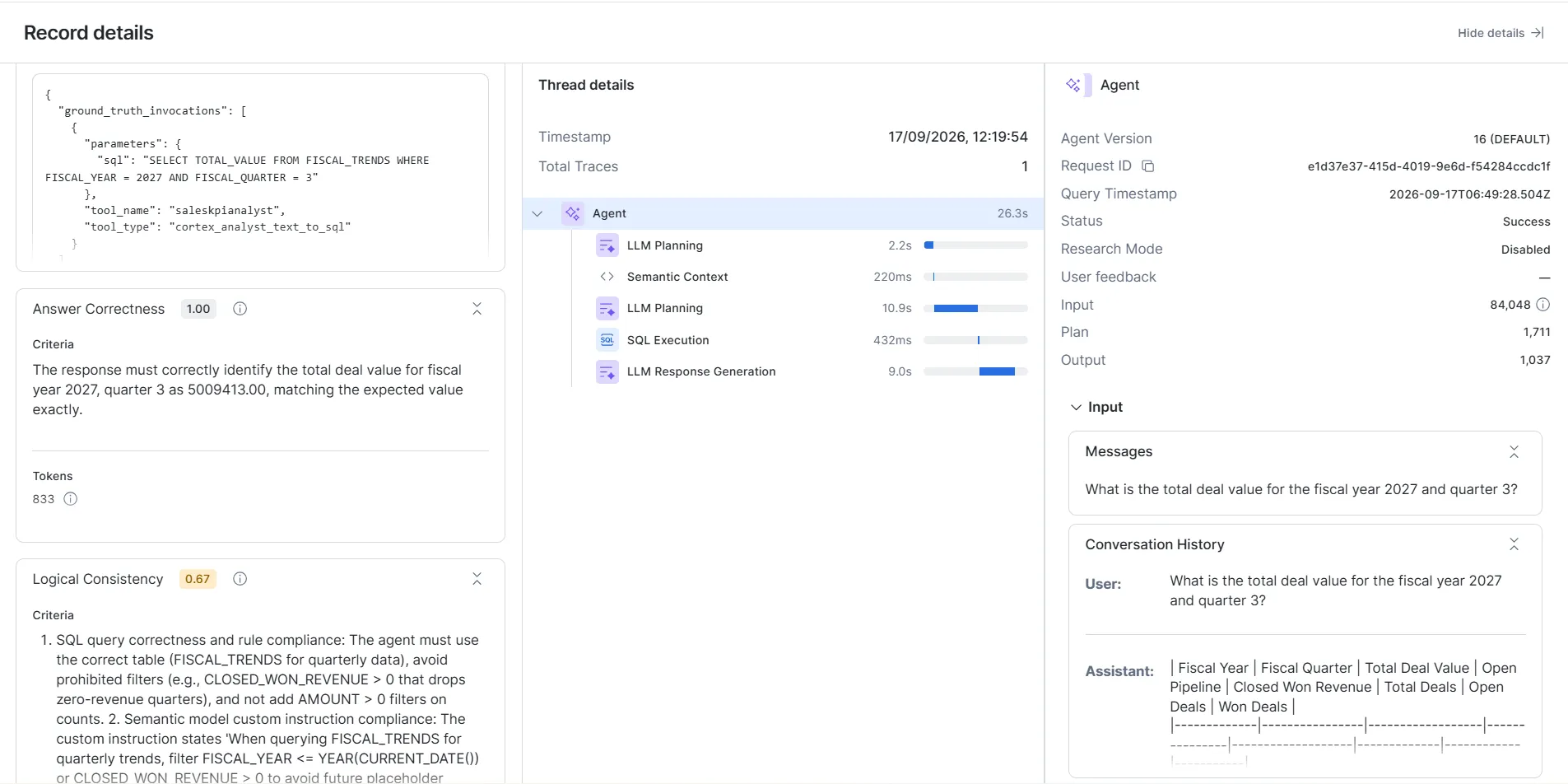
A stable score is more meaningful than a high one. A metric sitting at 100% usually means your dataset is too easy. A score that swings between runs with no real changes usually means the agent is inconsistent, not the evaluation. Treat the judge as a strong first pass: spot-check records against the trace, or have a subject-matter expert score a sample.
Custom metrics for domain-specific checks
The four built-in metrics won’t cover brand tone, regulatory phrasing, or groundedness against a specific document set. Custom metrics fill that gap, with or without ground truth, defined entirely in YAML:
metrics:
  - name: "groundedness"
    model: "claude-sonnet-4-6"   # pin the judge so scores stay comparable
    score_ranges:
      min_score: [0, 3]      # low quality
      median_score: [4, 6]   # medium quality
      max_score: [7, 10]     # high quality
    prompt: |
      Rate 1-10 how well every claim in the agent's response is
      supported by the retrieved tool outputs and data in the trace.
      User query: {{input}}
      Agent response: {{output}}
      Expected answer: {{ground_truth}}
score_ranges maps your prompt’s scale onto low, medium, and high bands. Beyond {{input}}, {{output}}, and {{ground_truth}}, template variables such as {{tool_info}}, {{duration}}, and {{span_type}} pull straight from the trace. Set the judge explicitly with the model key. Snowflake is moving the custom-metric default from claude-4-sonnet to claude-sonnet-4-6, and pinning the model keeps scores comparable across that change.
How to keep evaluation scores trustworthy in production
Evaluation is a process change, not a feature you switch on. Scores only mean something when the agent, the judge, and the dataset are all pinned and versioned.
Cortex Agent versioning makes runs repeatable. Every agent has one mutable live version for development plus immutable named versions you create by committing. Ship changes with ALTER AGENT, never CREATE OR REPLACE AGENT, which Snowflake warns is destructive to past evaluation runs and monitoring traces. Aliases such as production and staging route traffic, so promotion and rollback are just a matter of repointing the alias:
ALTER AGENT my_agent COMMIT
  COMMENT = 'Improved tool selection logic';

-- promote a new version to production
ALTER AGENT my_agent MODIFY VERSION VERSION$4 SET ALIAS = production;

-- roll back instantly
ALTER AGENT my_agent MODIFY VERSION VERSION$3 SET ALIAS = production;
Gate changes in CI/CD
- Source-control the agent spec, the semantic view, and the evaluation config YAML.
- On each pull request, deploy to a staging agent, run the evaluation, and gate the merge on a threshold such as answer_correctness >= 0.75.
- Pin the orchestration model, the committed agent version, and the metric version, so scores don’t shift for reasons unrelated to your change.
- Use progressive thresholds: advisory in dev, hard gates in QA, and the strictest bar in production with automatic rollback. Base them on observed baselines, or the gates get flaky.
Budget for judge cost before you scale. In Snowflake’s example, a 20-question dataset scored on 3 metrics makes 60 judge calls per run. You also pay for the agent running each query, warehouse time for tasks and metric queries, and storage for datasets and results.
Catch drift on a schedule
Separately from CI, run the full evaluation set against production daily, or hourly per Snowflake’s guidance, to catch drift you didn’t cause: a model update, upstream data changes, or tool and config drift. Put CREATE ALERT on the results for drops in answer correctness, latency spikes, reliability dips, or falling user feedback.
Required access
At minimum, the running role needs a Cortex database role such as SNOWFLAKE.CORTEX_USER, EXECUTE TASK ON ACCOUNT, MONITOR (or ownership) on the agent, and usage on the agent’s and dataset’s schemas. The full privilege list also covers task, file format, and stage creation. Snowsight runs use your currently selected role, not your default.
What Cortex Agent evaluations don’t cover
Everything above assumes a native Cortex Agent. For a custom LLM app, a RAG pipeline, or an agent built elsewhere, Snowflake’s AI Observability, built on the open-source TruLens library, applies the same LLM-as-judge approach to an application registered as an External Agent. See Evaluate applications with TruLens.
Outside Snowflake, a few tools are worth knowing if you need multi-framework support or a second, independent judge:
| Tool | Best known for |
|---|---|
| LangSmith | Deep tracing and evaluation native to LangChain and LangGraph agents |
| Arize Phoenix | OpenTelemetry-native, self-hostable tracing and evaluation |
| Ragas | Research-backed metrics for RAG retrieval and generation |
| DeepEval | Pytest-style, code-first CI testing with a broad metric library |
As of November 2026, these gaps are worth knowing, with what to do instead:
- Large datasets or slow custom metrics can time out. Split the dataset, or shorten a slow custom metric’s prompt.
- Each row is scored as a single turn. One input produces one trace and one score, independent of any session history. If your agent fails three turns into a conversation, embed the prior turns in a single input, or test conversations with a multi-turn tool.
- MCP server tools aren’t called, so test those integrations separately.
- Session attributes and row access policies aren’t supported. If your agent is role-scoped or multi-tenant, script manual test sessions per role for now.
- Code execution files aren’t saved, so you can’t evaluate them. TSA and TEA also score only Cortex Analyst, Cortex Search, web search, and custom tools. For anything else, use answer correctness, logical consistency, or a custom metric that inspects {{output}}.
- Ground truth goes stale. Anchor queries to fixed windows, such as “revenue between January and March 2026” rather than “this quarter’s revenue,” and review the dataset on a schedule.
Where to start with agent evaluation
Teams that get value from evaluation rarely set it up because Snowflake ships it. They set it up after a silent regression already cost them something, or after a confident change scored worse on questions nobody had tested.
If that’s where you are, start small. Turn on logical consistency, write ground truth for your five most common queries, and add answer correctness on top. Then keep that ground truth current as your data and instructions change. A fixed test set graded against an evolving agent only proves it passed a test that no longer matters.
Frequently asked questions
What are Cortex Agent evaluations?
Cortex Agent evaluations are a Snowflake feature that runs a native Cortex Agent against a test dataset, traces each step, and scores the results with LLM judges inside your Snowflake account. The feature became generally available on March 13, 2026.
What metrics do Cortex Agent evaluations use?
Cortex Agent evaluations use four built-in metrics from Snowflake’s Goal-Plan-Action framework: tool selection accuracy, tool execution accuracy, answer correctness, and logical consistency. You can add custom LLM-judge metrics defined in YAML.
Do I need ground truth to evaluate a Cortex Agent?
Not for every metric. Logical consistency is reference-free and needs no ground truth, which makes it the easiest place to start. Answer correctness, tool selection accuracy, and tool execution accuracy all need ground truth in the dataset.
How much does a Cortex Agent evaluation cost?
You pay for the agent running each test query, for judge inference on each metric, for warehouse time, and for storage. In Snowflake’s example, 20 questions scored on 3 metrics make 60 judge calls per run. Tool selection accuracy uses no judge.
Can Cortex Agent evaluations test multi-turn conversations?
Each dataset row produces one trace and one score, independent of session history. To test behavior that depends on earlier turns, include those turns in a single input or use a multi-turn evaluation tool.
Need help evaluating your Cortex Agents?
Atrium helps teams design evaluation datasets, wire up CI/CD gates, and move Cortex Agents from prototype to trusted production use. Explore our Snowflake Cortex AI services.