


The Architecture Crossroads: dbt Incremental Models vs. Snowflake Dynamic Tables
TLDR/key takeaways:
- The core difference in dbt vs Snowflake Dynamic Tables is who owns change tracking: with dbt incremental models your engineers write and maintain the logic, and with Snowflake Dynamic Tables Snowflake detects changes and schedules refreshes.
- Snowflake Dynamic Tables treat target lag as a best-effort freshness goal with a 60-second minimum, not a refresh schedule or a latency guarantee.
- Incremental processing is cheaper only when the change volume is small; at high change volumes a full rebuild can cost less, which is why Snowflake offers an ADAPTIVE refresh mode.
- Many Snowflake teams use both tools: Dynamic Tables near the source for freshness, and dbt incremental models downstream where business logic needs explicit control.
So which one should own each layer of your pipeline?
Most data engineering teams eventually hit the same wall. Dropping and rebuilding a table every run works fine at a few million rows. Then the table grows, the business wants hourly refreshes instead of nightly ones, and a ten-minute job starts eating a real share of the compute budget. The way forward is to process only what changed.
That raises the question at the center of dbt vs Snowflake Dynamic Tables: who is responsible for knowing what changed? Your engineers, maintaining that logic by hand, or the platform?
With dbt incremental models, you own the change tracking logic. With Snowflake Dynamic Tables, Snowflake owns it and you configure it. Here’s how each one works, where each breaks down, and how to choose.
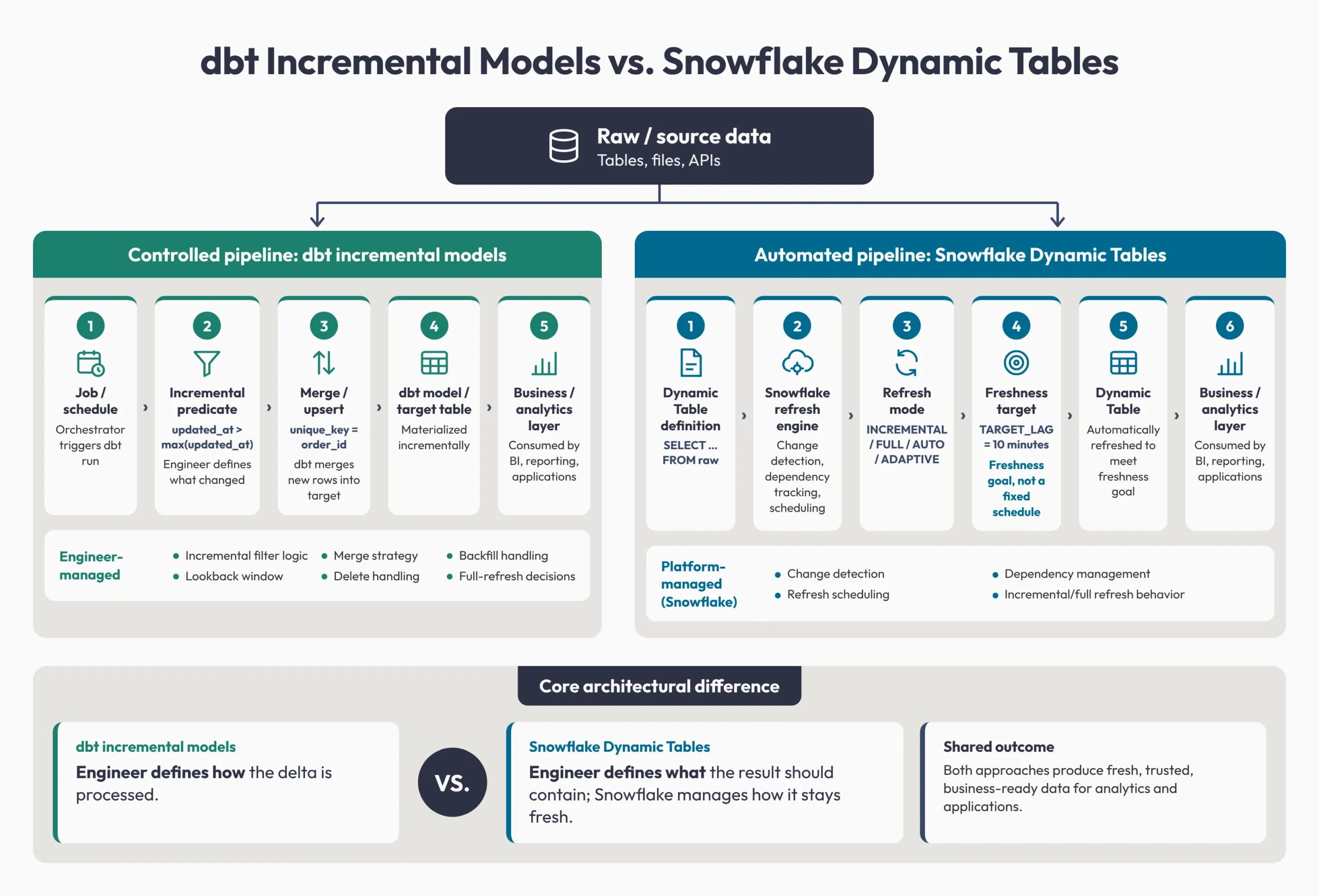
How dbt incremental models track change
A dbt incremental model is a normal SELECT statement with one extra instruction: only pull the rows that changed since the last run.
{{ config(
    materialized='incremental',
    unique_key='order_id'
) }}

select
    order_id,
    customer_id,
    amount,
    updated_at
from {{ ref('raw_orders') }}

{% if is_incremental() %}
where updated_at > (select coalesce(max(updated_at), '1900-01-01') from {{ this }})
{% endif %}
The WHERE clause carries the whole approach: grab only rows newer than the latest timestamp already in the target table. You define what “new” means, and unique_key controls how fresh rows merge into existing data (our guide to incremental strategies in dbt covers the merge options). That flexibility comes with a cost: your team owns every edge case.
Late-arriving data is the usual headache. Say your pipeline has loaded everything up to 10:00 AM. At 10:30 AM a delayed record arrives with a 9:55 AM timestamp, and the filter skips it. Teams widen the filter to look back a few days, and dbt’s microbatch strategy (dbt 1.9 and later) adds a lookback setting for this case. Either way, someone on your team picks the window and maintains it.
Deletes and backfills need the same manual attention. A filter on updated_at can’t see a row that no longer exists in the source, and a historical backfill usually means a deliberate full refresh.
How Snowflake Dynamic Tables track change
A Snowflake Dynamic Table materializes the results of a SELECT query and keeps them up to date automatically. Instead of writing the logic for what to process, you describe what the finished table should look like, and Snowflake handles change detection, dependency tracking, and refresh scheduling.
create dynamic table orders_dt
    target_lag = '10 minutes'
    warehouse = transform_wh
    refresh_mode = adaptive
as
select order_id, customer_id, amount, updated_at
from raw_orders;
That’s the philosophical difference. With dbt, you tell the warehouse how to process the change. With a Dynamic Table, you describe the result and Snowflake works out the rest.
Target lag is a freshness goal, not a schedule
It’s tempting to read target_lag = '10 minutes' as “refresh every 10 minutes.” Snowflake’s target lag documentation says it means the data should be no more than 10 minutes old, on a best-effort basis. Snowflake decides when to refresh, the real gap can exceed the target under load, and the minimum is 60 seconds.
Setting target_lag = downstream refreshes an upstream table only when a Dynamic Table reading from it needs fresh data. One catch: with no downstream consumers, it never refreshes, and Snowflake doesn’t warn you.
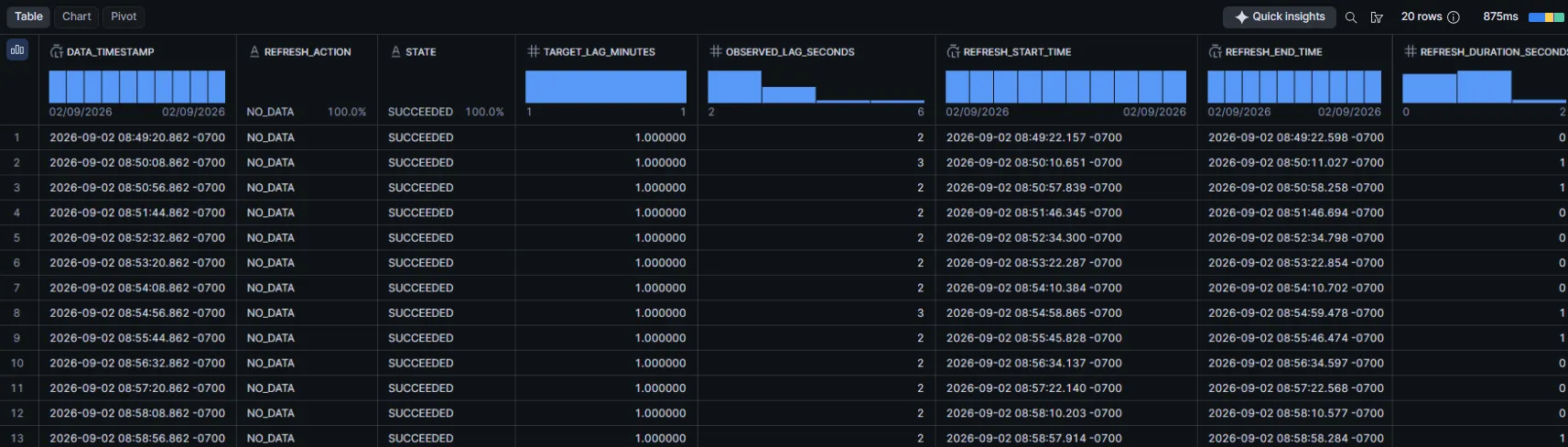
This refresh history comes from a Dynamic Table with a 1-minute target lag. Refreshes ran about every 48 seconds, and observed_lag_seconds stayed between 2 and 6 seconds. Note the REFRESH_ACTION column: every row reads NO_DATA, meaning nothing changed upstream. So this shows how Snowflake schedules against a lag target, not how fast it processes a heavy delta. Under a large change volume, observed lag can run past the target.
Refresh mode is configurable, and the default needs watching
Snowflake supports four managed refresh modes plus a custom option:
- INCREMENTAL processes only the data that changed since the last refresh.
- FULL re-executes the entire definition on every refresh.
- AUTO (the default) evaluates the definition once, at creation, and resolves to INCREMENTAL or FULL.
- ADAPTIVE refreshes incrementally and rebuilds the table when an incremental refresh would cost significantly more. AUTO never resolves to ADAPTIVE; you set it explicitly.
- CUSTOM_INCREMENTAL is for logic too complex for Snowflake to infer the delta. You write the MERGE or INSERT DML yourself.
AUTO resolves once and never re-evaluates. If an upstream change breaks incremental support after creation, the table doesn’t fall back to full refresh. Refreshes start failing, with no warning. ALTER can’t change the refresh mode, so the fix is CREATE OR REPLACE (or CREATE OR ALTER) with an explicit REFRESH_MODE. In production, set the mode explicitly.
Is incremental refresh always cheaper?
No. Incremental processing is cheaper only when a small share of the data changed.
- Small change, incremental wins. If only a slim slice of a huge table changed, processing just that slice is efficient.
- Large change, incremental can lose. If an upstream backfill touched a big share of the data, merging it can cost more than a rebuild. ADAPTIVE mode exists for this tradeoff.
Where the cost comes from also differs:
- dbt costs come down to job schedule, warehouse size, and filter tightness. incremental_predicates limit how much of the target table a merge scans.
- Dynamic Tables add Cloud Services credits to compute and storage. Per Snowflake’s cost documentation, those cover change detection, query compilation, and scheduling, and they run every refresh cycle even when no data changed (like the NO_DATA refreshes above).
- Tighter freshness costs more. Cloud Services costs scale with the number of Dynamic Tables, target lag, and pipeline depth. The common mistake is a lag far shorter than the business needs, or explicit lags on intermediate tables instead of DOWNSTREAM.
- Effort lands in different places. With dbt, you manage lookback windows, merge strategy, and full refreshes. With Dynamic Tables, you keep queries within what incremental refresh supports. CURRENT_TIMESTAMP() in the SELECT, for example, resolves AUTO to full refresh and makes an explicit INCREMENTAL table fail at creation.
When to use dbt vs Snowflake Dynamic Tables
Decide by the complexity of each transformation, not by which pipeline layer it sits in. Weigh freshness needs, logic complexity, control, and cost. That often puts Dynamic Tables near the raw data, where staging work is mostly repetitive state tracking, and dbt incremental models downstream, where anything feeding financial or customer-facing metrics deserves explicit control. It’s a pattern, not a rule: Dynamic Tables can hold real transformation logic if the query supports incremental refresh.
You also don’t have to choose operationally. The dbt-snowflake adapter supports a dynamic_table materialization, so a Dynamic Table can live in a dbt project with version control and tests while Snowflake runs the refreshes. Per dbt’s docs, changing its SQL requires a full refresh, and model contracts aren’t supported.
A layered pipeline often looks something like this:
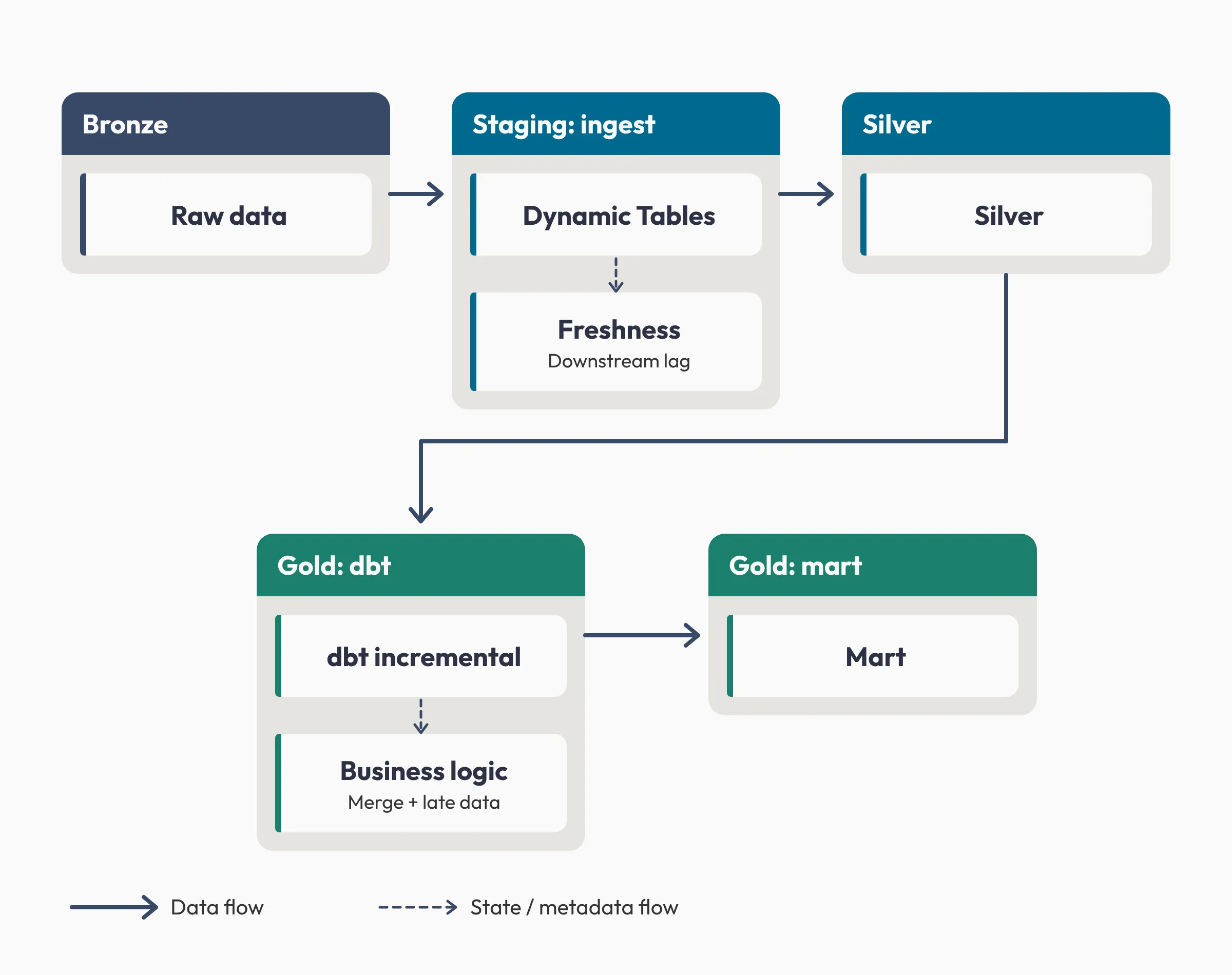
Bronze lands raw data, and Dynamic Tables in staging refresh it into silver while tracking freshness lag. A dbt incremental model then applies merge and late-data business logic to build the gold mart. The same split works if your middle layer is a data vault.
A few questions settle most cases:
| Situation | Pick | Reason |
|---|---|---|
| Late-arriving data needs a specific lookback window, or the merge logic carries real business rules | dbt | You control exactly what counts as “changed” and how new rows merge in |
| You want predictable, scheduled runs instead of chasing a freshness target | dbt | Orchestrator-driven runs are easier to reason about than a best-effort lag target |
| The table needs tests, documentation, and CI, or backfills need to stay deliberate and auditable | dbt | Testing, docs, and explicit refresh commands are built into a dbt project |
| The transformation is a clean SELECT: filters, joins, aggregations | Dynamic Tables | Snowflake can track the change and refresh it without help |
| A freshness target is preferable to managing exact refresh timing by hand | Dynamic Tables | target_lag replaces a hand-maintained schedule |
| Maintaining hand-written incremental filters is no longer sustainable at scale | Dynamic Tables | Snowflake handles the delta logic for you |
Dynamic Tables aren’t built for sub-minute freshness or a hard latency guarantee. If that’s the requirement, you need a pipeline whose timing you control end to end.
Frequently asked questions
Is target lag in Snowflake Dynamic Tables a refresh schedule?
No. Target lag is a best-effort freshness target: TARGET_LAG = ’10 minutes’ means the data should be no more than 10 minutes old, not that the table refreshes every 10 minutes. Snowflake decides when to refresh, the minimum target lag is 60 seconds, and actual lag can exceed the target under heavy load.
Can you build Snowflake Dynamic Tables with dbt?
Yes. The dbt-snowflake adapter supports materialized=’dynamic_table’ with configs such as target_lag, snowflake_warehouse, and refresh_mode. dbt manages the definition, version control, and tests, while Snowflake runs the refreshes. Changing the table’s SQL requires a full refresh.
How do dbt incremental models handle late-arriving data?
Only as well as the filter you write. A filter on the latest loaded timestamp skips records that arrive late with older timestamps, so teams widen it with a lookback window. dbt’s microbatch strategy includes a lookback config that reprocesses a set number of prior batches to capture late records.
Can you change a Dynamic Table’s refresh mode after it’s created?
Not with ALTER. ALTER DYNAMIC TABLE doesn’t support changing the refresh mode, so you recreate the table with CREATE OR REPLACE or CREATE OR ALTER DYNAMIC TABLE and set REFRESH_MODE explicitly. AUTO resolves once at creation and doesn’t re-evaluate on later refreshes.
Need help drawing the boundary in your pipeline?
Choosing between dbt and Snowflake Dynamic Tables is an architecture decision more than a tool choice. The teams that get it right don’t run every layer through a favorite. They decide layer by layer and revisit the call as the pipeline grows, instead of living with whatever they set up on day one.
If you’re unsure where that boundary should sit, Atrium, a Snowflake Elite Services Partner, can audit your current state-tracking setup and re-architect it around where your data needs to go. Explore our Snowflake data engineering services.