


How Airflow and dbt Work Better Together
As your data platform grows, collecting data stops being the hard part. The harder problem is making sure data moves through complex pipelines in the right sequence, at the right time, and arrives as reliable, analytics-ready datasets your business will actually trust.
To solve that, most data teams lean on two distinct capabilities:
- Orchestration manages when and how different tasks execute across a data pipeline.
- Transformation converts raw data into clean, analytics-ready datasets that business users can trust.
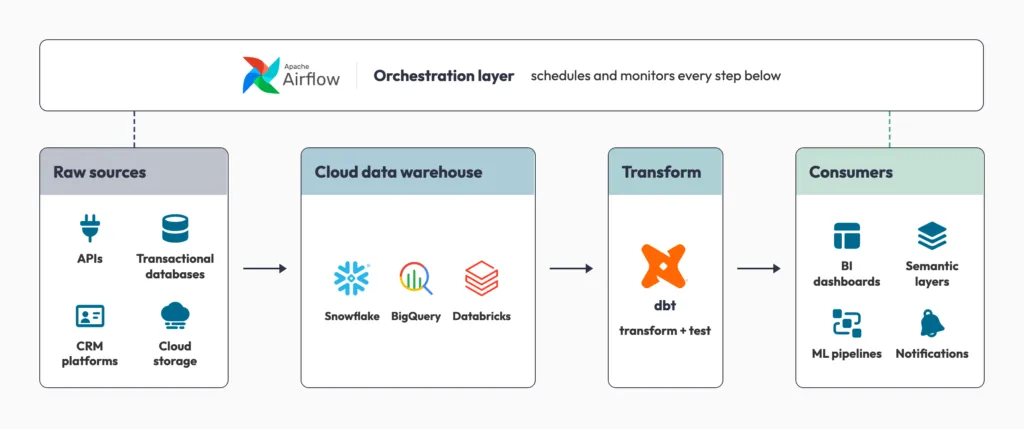
This is where Apache Airflow and dbt complement each other. Airflow serves as the orchestration layer, coordinating workflow execution, managing dependencies, handling retries, and monitoring pipeline health. dbt focuses on the transformation layer, so your team can build, test, document, and maintain data models directly inside your cloud data warehouse.
The rise of modern cloud platforms such as Snowflake, Google BigQuery, and Databricks has accelerated adoption of the ELT (Extract, Load, Transform) approach, in which raw data is first loaded into the warehouse and transformed later using scalable cloud compute. In that architecture, Airflow ensures data arrives at the right place at the right time, and dbt turns that data into reliable, business-ready information.
Together, Airflow and dbt provide a scalable and maintainable framework for building modern data pipelines. What follows is the role each tool plays, how they fit together, and the integration approaches that hold up in production.
What is Apache Airflow?
Apache Airflow is a platform for programmatically authoring, scheduling, and monitoring data workflows. It sits above your pipelines and decides what runs, when, and in what order. In Airflow, pipelines are defined as code using Directed Acyclic Graphs (DAGs). A DAG is a map of tasks that must run in a specific order. Task A could load raw customer data into a data warehouse, and Task B could run dbt transformations on that data. Because the transformations depend on the data being loaded first, Task B cannot start until Task A finishes successfully.
What Airflow handles in the backend
- Cron-based scheduling: executing pipelines on a strict schedule, such as every hour or at 2 a.m. daily.
- Dependency management: making sure data extraction from the source system completes before Airflow attempts to load that data into your warehouse.
- Fault tolerance: if an API fails or a connection times out, Airflow catches the error, initiates a retry, and alerts your engineering team if the issue persists. Retry behavior is configurable through task parameters.
Instead of guessing what ran and what did not, your team can see exactly which tasks executed, what they depended on, and where they are failing. That clarity matters most in production, where one small failure can quietly break a downstream report or dashboard.
What is dbt?
dbt focuses entirely on transforming data inside your data warehouse. It comes in two forms: dbt Core and dbt Cloud.
It allows teams to:
- Write transformations using SQL
- Build modular data models and test data quality
- Document data logic
For a deeper dive on dbt strategies, read A Simple Guide to Incremental Strategies in dbt.
Integrating Airflow with dbt
Airflow is good at making sure data arrives on time. It has no opinion about whether the data that arrives is messy, unformatted, or raw. That is dbt’s job: it takes the raw data Airflow scheduled and transforms it into clean, reliable business metrics.
Step 1: Airflow starts the pipeline
The process begins when Airflow triggers a DAG at a scheduled time, such as every hour or daily at 2 a.m. At this stage, Airflow acts as the orchestration layer, deciding when workflows run, tracking task execution, managing dependencies, and allocating tasks to workers.
The first task in the DAG is usually responsible for ingesting raw data into the warehouse from systems such as APIs, transactional databases, CRM platforms, and cloud storage. That raw data then lands in a cloud warehouse like Snowflake or Google BigQuery.
This is the modern ELT approach: Extract → Load → Transform. Instead of transforming data before loading it, you preserve raw data inside the warehouse and transform it later using scalable cloud compute.
Step 2: Airflow triggers dbt to build and test
Once the raw data is available in the warehouse, Airflow triggers dbt execution.
A common misconception is that Airflow performs the transformations itself. In reality, Airflow orchestrates the execution of dbt commands as independent tasks within the DAG.
The most robust way to do this is the dbt build command. Instead of separating the run and test steps, dbt build runs your models, tests them, and snapshots them concurrently in DAG order. If a model fails to build, or builds but fails one of its tests (a null check, a unique constraint, accepted values, primary-foreign key constraints, or a custom business rule), dbt build stops propagating that model’s data forward. Every downstream model that depends on it is skipped rather than built on top of corrupted or invalid data.
This behavior is configurable. dbt tests support different severity levels, and in some scenarios teams choose to treat certain test failures as warnings instead of errors. With warning severity, the failure is reported, but the pipeline can continue, and downstream models can still be built if that aligns with business requirements. Why dbt unit testing is non-negotiable goes deeper on which tests earn a hard failure and which do not.
The payoff: bad data never reaches the marts your dashboards and reports depend on, because the pipeline halts exactly at the point of failure instead of building blindly through it. Airflow then surfaces this as a failed task, blocking the downstream steps in the DAG (refreshes, notifications, ML triggers) and alerting your engineering team, just as it would for any other task failure.
While dbt run executes only SQL models, dbt build runs models along with their associated tests and snapshots. Use dbt build because it combines transformation and validation in a single workflow, which helps ensure data quality before downstream models are created.
This is commonly done using operators such as:
- BashOperator
- KubernetesPodOperator
- DockerOperator
dbt_build = BashOperator(
    task_id='dbt_build',
    bash_command='dbt build'
)
BashOperator works, but it has limits at scale.
- No task-level visibility: if 20 dbt models run inside one BashOperator and model 15 fails, Airflow only sees one failed task. You lose granular observability.
- Shared environment risk: dbt runs in the same environment as the Airflow worker, so dependency conflicts can silently break things.
- No retry isolation: retrying the task reruns all models, not just the one that failed.
Here are three better approaches for production.
Option 1: Parse manifest.json for dynamic task mapping
After the dbt build, dbt generates a manifest.json file containing the full graph of your models and dependencies. Parse this at DAG load time to create one Airflow task per dbt model, which gives you true per-model observability and retry capability.
import json
from airflow.operators.bash import BashOperator

with open("target/manifest.json") as f:
    manifest = json.load(f)

for node_name, node in manifest["nodes"].items():
    if node["resource_type"] == "model":
        BashOperator(
            task_id=f"dbt_build_{node['name']}",
            bash_command=f"dbt build --select {node['name']}"
        )
Option 2: KubernetesPodOperator for environment isolation
Instead of running dbt inside the Airflow worker, spin up a dedicated container per task. This gives you clean dependency isolation, resource control, and no risk of one pipeline affecting another.
from airflow.providers.cncf.kubernetes.operators.kubernetes_pod import KubernetesPodOperator

dbt_run = KubernetesPodOperator(
    task_id="dbt_build",
    name="dbt-build-pod",
    image="your-dbt-image:latest",
    cmds=["dbt", "build"],
    namespace="airflow",
    get_logs=True,
    is_delete_operator_pod=True,
)
DockerOperator offers similar container-level isolation to KubernetesPodOperator, but it runs against a Docker service directly rather than a Kubernetes cluster. That makes it a simpler option for teams not on Kubernetes.
Option 3: Astronomer Cosmos, dbt lineage rendered as Airflow tasks
The open-source Cosmos library from Astronomer renders your entire dbt project as native Airflow tasks with dependencies intact, so there is no manual manifest parsing.
from cosmos import DbtDag, ProjectConfig, ProfileConfig

my_dbt_dag = DbtDag(
    project_config=ProjectConfig("/path/to/dbt/project"),
    profile_config=ProfileConfig(...),
    schedule_interval="@daily",
)
Cosmos also runs dbt tests automatically after each model run and captures dbt model dependencies as Airflow tasks, so the DAG reflects your dbt lineage.
At this stage, Airflow manages orchestration and execution state, dbt compiles the transformation models, and the SQL executes directly inside the warehouse. The interaction is intentionally loosely coupled:
Airflow → dbt CLI → Warehouse
Airflow does not need to understand dbt’s internal logic. It triggers dbt as a task and tracks the result. Airflow decides when to run. dbt decides what to run. That separation is what makes these pipelines easier to maintain, debug, and scale independently.
Step 3: dbt executes transformations
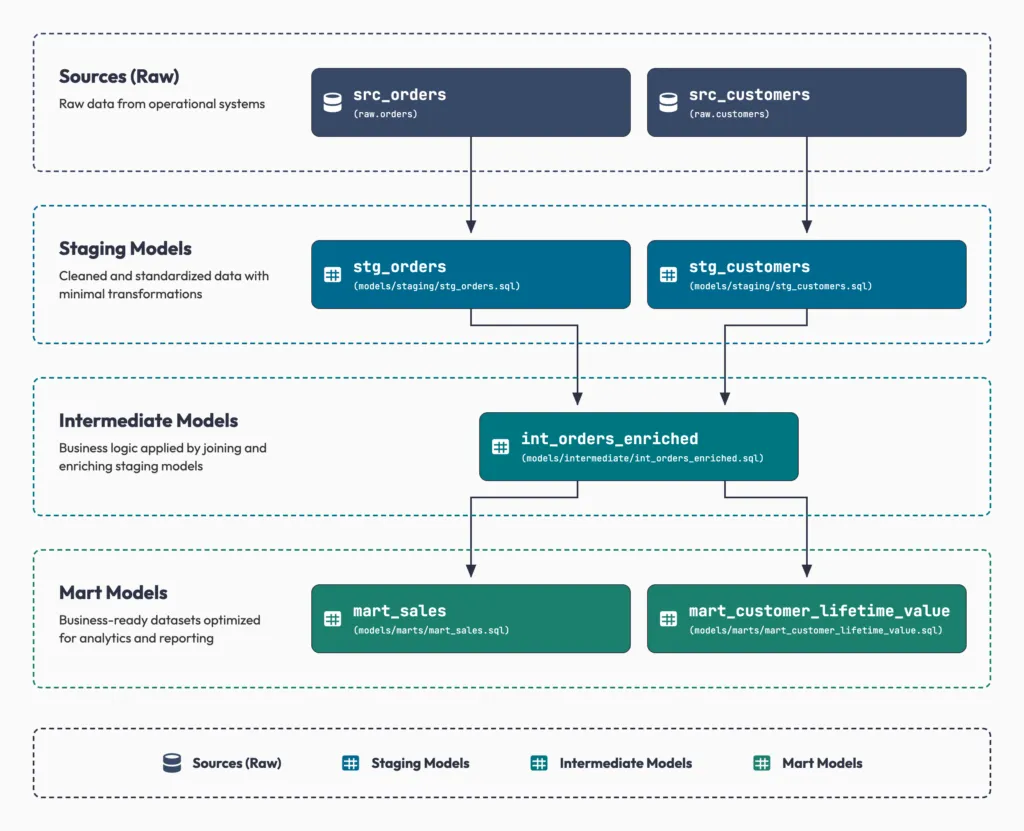
Once triggered, dbt takes control of the transformation layer. It cleans raw tables, builds staging models, applies joins and aggregations, implements your business logic, and generates the analytics-ready marts your reporting depends on. Getting that layer to rebuild the same way every time is the hard part, and enable repeatable analytics with Snowflake and dbt walks through it.
Unlike traditional ETL systems that transform data externally, dbt pushes computation directly into the warehouse engine, using the scalability of modern cloud platforms. The same principle drives data pipelines built with Snowpark, where the compute stays next to the data. dbt also brings software engineering practices into analytics workflows: modular SQL models, reusable transformations, lineage tracking, and generated documentation. That makes transformation logic easier to maintain and easier to share across teams.
Step 4: Airflow continues through the pipeline
Once testing succeeds, Airflow continues orchestrating downstream tasks. That may include:
- refreshing dashboards and updating semantic layers
- triggering machine learning pipelines
- sending Slack or email notifications
- publishing datasets to reporting tools
If tests fail:
- downstream tasks are blocked
- retries may be triggered
- alerts go to your engineering team
- pipeline execution is marked as failed
This fault-tolerant behavior keeps unreliable or corrupted data away from your business users.
Stop firefighting your pipelines
Data engineering does not have to be a frantic exercise in putting out fires. Decoupling orchestration from transformation gives you an architecture where each layer does one job well.
Apache Airflow gives you the control and visibility to reliably move data across complex systems. dbt lets you transform that data with the rigor, testing, and documentation of software engineering. Together, they let your team stop worrying about broken pipelines and start delivering data the business trusts.
The teams that get this right are not the ones running the most DAGs. They are the ones who can tell you, on any given morning, exactly what ran, what it produced, and why they believe it.